


 Home >
 Knowledge Base >
 FAQs >
 Downloads >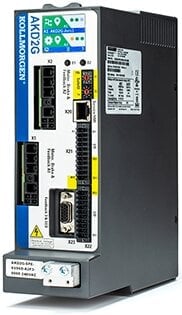
AKD2G
The AKD2G servo drive introduces the Kollmorgen Servo-on-a-Chip which is a powerful compute engine that can control 2 axes simultaneously and up to 28 I/O. The AKD2G is optimized for single-cable motors.
- One- and Two-Axis variants
- Plug & Play with all Kollmorgen motors
- EtherCAT and CANopen compatibility
- SFD and HIPERFACE DSL feedbacks are standard
- Optional feedbacks include EnDAT, BiSS, analog sine/cosine encoder, incremental encoder, resolver, and more
- SIL-qualified over-voltage, current, and temperature detection
- Dual-channel STO per axis
| Current Firmware Version | 2.08.00.000 |
| Firmware Release Date | November 2021 |
| Part Number Scheme | Open the PDF |
| See the WorkBench article for details about the software used to configure and manage the drives. | |
120/240 Vac Specifications
| Model | Axes | Continuous Current (Arms) | Peak Current (Arms) | Typical Shaft Power (kW) | Internal Regen (W / Ω) |
|---|---|---|---|---|---|
| AKD2G-6V03S | Single | 3 | 9 | 1 | 100 / 15 |
| AKD2G-6V06S | 6 | 18 | 2 | ||
| AKD2G-6V12S | 12 | 30 | 4 | ||
| AKD2G-6V03D | Dual | 3 & 3 | 9 & 9 | 1 & 1 | |
| AKD2G-6V06D | 6 & 6 | 18 & 18 | 2 & 2 |
240/480 Vac Specifications
| Model | Axes | Continuous Current (Arms) | Peak Current (Arms) | Typical Shaft Power (kW) | Internal Regen (W / Ω) |
|---|---|---|---|---|---|
| AKD2G-7V03S | Single | 3 | 9 | 2 | 100 / 33 |
| AKD2G-7V06S | 6 | 18 | 4 | ||
| AKD2G-7V12S | 12 | 30 | 8 | ||
| AKD2G-7V03D | Dual | 3 & 3 | 9 & 9 | 2 & 2 | |
| AKD2G-7V06D | 6 & 6 | 18 & 18 | 4 & 4 |
| AKD to AKD2G Migration FAQ | English |  Ann Pater Ann Pater |
|
| AKD1G vs AKD2G EtherNet/IP Command and Response Assembly Structure | English |  …
… |
|
| Grounding and Shielding Landing Page (Prevent Noise Issues) | English | Ann Pater |
|
| AKD2G and KAS Functional Safety Landing Page | English |  C Wontrop
 |
|
| Migration from AKD EtherCAT IP mode to AKD2G CSP mode | English |  jcoleman02
 |
|
| KAS v3.07 is now available!! | English |  dusty.…
 |
|
| AKD2G Touchprobes Application Note | English |
… |
|
| KAS Safety System with SCU Safety Controller | English |
C Wontrop |
|
| What is a Subnet Mask? | English |
jcoleman02 |
Although Windows displays this message and the limited functionality icon for the drive connection, your PC can communicate fully with the drive. This message and the icon are normal for an AKD to PC connection.
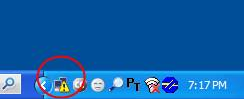
This is because you are using the Windows classic theme. To get a white background you must change the theme that Windows is using.
To change the theme go to the Control Panel, select Display, select the Themes tab, and choose a new theme, such as "Windows XP".
See Device not Shown in the Workbench Help for a detailed discussion of this problem.
If you are communicating through the Ethernet port at connector X11, you might not see your drive in the connect window for any of the following reasons:
- Poor cable connection. Make certain you have a good connection between your computer and the drive by checking to see if you see a blinking light next to the connector (at each end).
- Improper rotary switch setting. Make certain that the S1 and S2 rotary switches on the front of the drive are set to 0 (bottom position), unless you are attempting a point to point connection and your computer is set up to connect in this manner.
- Conflict with another device that is networked to your computer (including your wireless connection). In some cases, turning off your wireless card will fix this. You can turn your wireless card back on after you establish communication with the AKD).
- Improper TCP/IP settings. Make certain that the TCP/IP settings in the network port that you are communicating through are working properly.
In most cases, firmware is downloaded using WorkBench without setting the hardware into a specific “download” state. If you need to download firmware, but are unable to connect to WorkBench, use the procedure described in Forcing the drive into firmware download mode in the Workbench help.
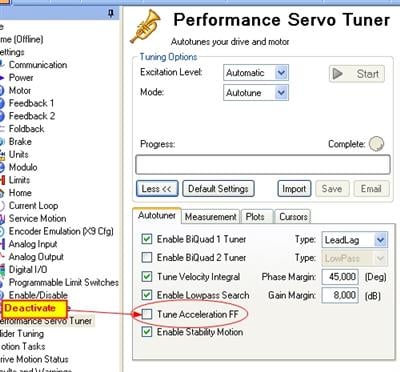
Autotuning of your application delivered unexpected results while tuning the current feed forward value. Please deactivate "Tune Acceleration FF" in the Workbench Performance Servo Tuner screen and restart the tuning.
Up to 500 s depending on the active current. See page Foldback Times.