


 Home >
 Knowledge Base >
 FAQs >
 Downloads >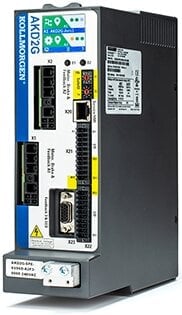
AKD2G
The AKD2G servo drive introduces the Kollmorgen Servo-on-a-Chip which is a powerful compute engine that can control 2 axes simultaneously and up to 28 I/O. The AKD2G is optimized for single-cable motors.
- One- and Two-Axis variants
- Plug & Play with all Kollmorgen motors
- EtherCAT and CANopen compatibility
- SFD and HIPERFACE DSL feedbacks are standard
- Optional feedbacks include EnDAT, BiSS, analog sine/cosine encoder, incremental encoder, resolver, and more
- SIL-qualified over-voltage, current, and temperature detection
- Dual-channel STO per axis
| Current Firmware Version | 2.08.00.000 |
| Firmware Release Date | November 2021 |
| Part Number Scheme | Open the PDF |
| See the WorkBench article for details about the software used to configure and manage the drives. | |
120/240 Vac Specifications
| Model | Axes | Continuous Current (Arms) | Peak Current (Arms) | Typical Shaft Power (kW) | Internal Regen (W / Ω) |
|---|---|---|---|---|---|
| AKD2G-6V03S | Single | 3 | 9 | 1 | 100 / 15 |
| AKD2G-6V06S | 6 | 18 | 2 | ||
| AKD2G-6V12S | 12 | 30 | 4 | ||
| AKD2G-6V03D | Dual | 3 & 3 | 9 & 9 | 1 & 1 | |
| AKD2G-6V06D | 6 & 6 | 18 & 18 | 2 & 2 |
240/480 Vac Specifications
| Model | Axes | Continuous Current (Arms) | Peak Current (Arms) | Typical Shaft Power (kW) | Internal Regen (W / Ω) |
|---|---|---|---|---|---|
| AKD2G-7V03S | Single | 3 | 9 | 2 | 100 / 33 |
| AKD2G-7V06S | 6 | 18 | 4 | ||
| AKD2G-7V12S | 12 | 30 | 8 | ||
| AKD2G-7V03D | Dual | 3 & 3 | 9 & 9 | 2 & 2 | |
| AKD2G-7V06D | 6 & 6 | 18 & 18 | 4 & 4 |
| AKD2G EtherCAT and CANopen Landing Page | English |  …
… |
|
| AKD2G Ethernet IP Command Type 0x08-Velocity Setpoint | English |
… |
|
| RS232 and RS485 Specifications | English |  Ann Pater Ann Pater |
|
| Resolving Servo Feedback Choices | English | kenny.… |
|
| AKD2G Standard EtherNet/IP and CIP Sync Landing Page | English |
… |
|
| AKD2G vs AKD Profinet Comparison | English |  jcoleman02
 |
|
| Workbench loses connection when EtherCAT master is connected to the AKD using EoE | English |
jcoleman02 |
|
| Getting Started with the AKD/AKD2G Performance Tuner (PST) | English |  C Wontrop
 |
|
| Profinet Real-Time Jog in AKD vs. AKD2G | English |
jcoleman02 |
5 seconds with Ipeak. Smaller currents can be sustained for longer periods. See Foldback Times.
There are two ways to find out about what parameter is behind a text box in Workbench.
- Right click on the text box and select Parameter Info from the menu. A popup appears next to the window selected. Note if you clicked the Help, you get taken to the page in the help system. Pressing F1 also does the same.
- Click the “Tell me more about this topic” link at the top of each page.
First, check the LED on the RJ45 connector. If the LED is not illuminated, then no communication with the drive is possible. Possible causes for loss of communication with the drive include:
- The network cable is disconnected.
- A wiring problem exists between the drive and the network switch/hub.
- The switch/hub is not powered.
If the LED is lit and the IP address on the drive is 0.0.0.0, then the most likely problem is that the drive hardware has not detected a valid link.
This problem is related to the MSI installer. You can resolve it as follows:
- Cancel the installation.
- Make sure that you have enough disk space on your hard disk (~500MB) to allow Windows .NET update if necessary. If you do not have enough disk space, then make additional space for the installation.
- Relaunch the installer (you may need to try this several times, the problem is random).