


 Home >
 Knowledge Base >
 FAQs >
 Downloads >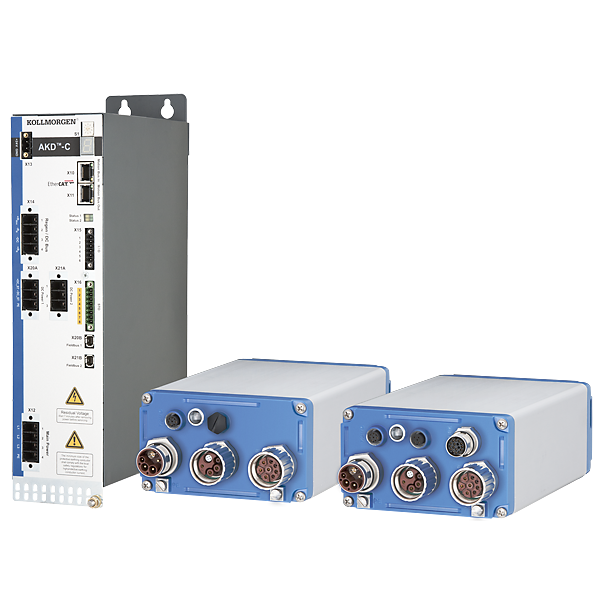
AKD-C/N
The AKD-C Power Supply and AKD-N drives lie at the core of a decentralized drive system. Up to 16 AKD-N drives can be connected to one AKD-C central power supply. Hybrid cables are used to connect the AKD-C to the drives and to daisy-chain the drives. For more specific information about the individual components, see the AKD-C and AKD-N topics.
| Current Firmware Version | 1.20.00.001 |
| Firmware Release Date | December 2020 |
| Current Hardware Revision (AKD-N) | B |
| Current Hardware Revision (AKD-C) | A |
| Hardware Release Date | 01/01/2014 |
| Part Number Scheme | AKD-N (PDF) AKD-C (PDF) |
| See the WorkBench article for details about the software used to configure and manage the drives. | |
| Components | |
|---|---|
| AKD-C | Central Power Supply |
| AKD-N | Decentralized Servo Drive |
Blue Boxes: All components in the blue box are products delivered by Kollmorgen. For detailed information click to the product or use the table below for navigation.
Gray Boxes: Elements in the gray area are components which have to be added by the machine builder.
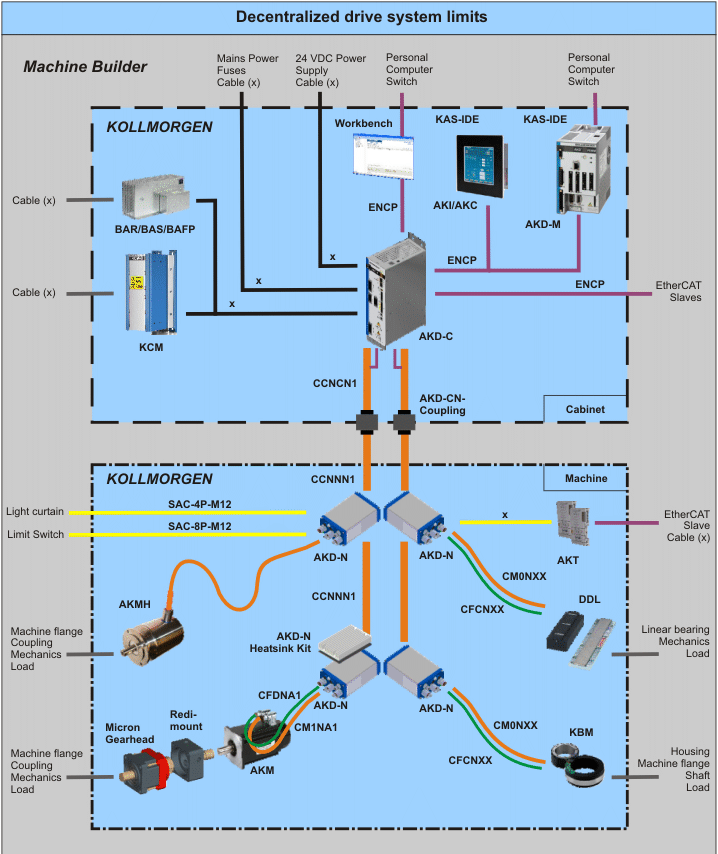
| AKD-C | AKD-C Power Supply |
|---|---|
| AKD-N | AKD-N Drive |
| AKD-CN-Coupling | Connector interface for cabinet wall (in process) |
| AKD-M | AKD PDMM Drive |
| AKM | AKM Motor |
| AKMH | AKMH Motor |
| AKI | Operating Console |
| AKT | KAS Input and Output Terminals |
| BAR/BAS/BAFP | Brake Resistor |
| Cx Cables | Configured CC/CM/CF cables for connection of the components, refer to the cable part number scheme |
| DDL | Linear motors (on request) |
| ENCP | Ethernet cables |
| Gearhead | Micron Gearheads |
| Heatsink Kit | optional accessory for AKD-N |
| KAS-IDE | KAS System Setup Tool |
| KBM | KBM Motor |
| KCM | KCM Capacitor Module |
| Redi Mount | Adapters to mount Micron Gearheads to AKM motors |
| Workbench | AKD Setup Tool |
| Water Cooled AKD-N12 with Heat Sink | English |  Matthias.… Matthias.… |
|
| Servoverstärker | German |  …
… |
|
| Prüfimpuls | German |
… |
|
| Servoantrieb | German |
… |
|
| Sicherheit | German |
… |
|
| Resolver Feedback | German |
… |
|
| SFD | German |
… |
|
| SFD3 | German |
… |
|
| Sinus Encoder | German |
… |
First, check the LED on the RJ45 connector. If the LED is not illuminated, then no communication with the drive is possible. Possible causes for loss of communication with the drive include:
- The network cable is disconnected.
- A wiring problem exists between the drive and the network switch/hub.
- The switch/hub is not powered.
If the LED is lit and the IP address on the drive is 0.0.0.0, then the most likely problem is that the drive hardware has not detected a valid link.
This problem is related to the MSI installer. You can resolve it as follows:
- Cancel the installation.
- Make sure that you have enough disk space on your hard disk (~500MB) to allow Windows .NET update if necessary. If you do not have enough disk space, then make additional space for the installation.
- Relaunch the installer (you may need to try this several times, the problem is random).