Kollmorgen Support Network

S600

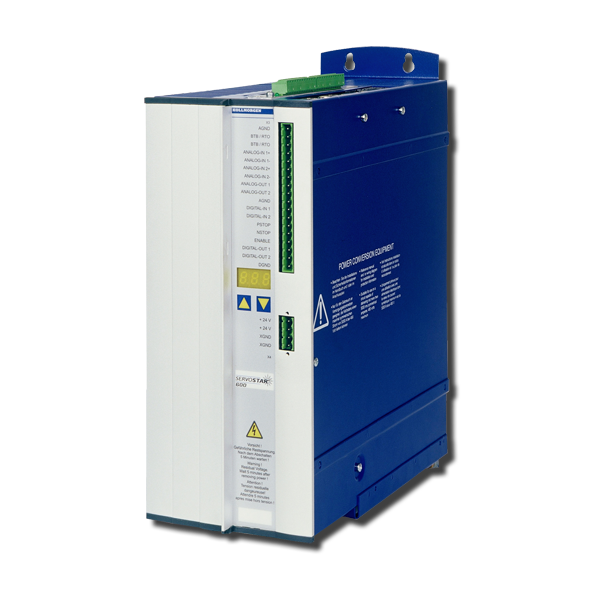
This servo amplifier is comprised of a three-phase power supply and a high-performance control unit housed in a single enclosure. This servo amplifier is available in 230VAC-480VAC, 1.5-20 Amp models.

NOTEThe S640 and S670 models (high-power models) have been discontinued.

Interfaces

Digital / Analog I/OsPosition Output
(encoder emulation)
MultiFieldbusMultiFeedback
  • 2 programmable analog inputs
  • 4 programmable digital inputs
  • 2 programmable digital outputs
  • 14 digital inputs and 8 outputs with expansion card I/O-14/08
  • RS232 service channel
  • Emulation incremental encoder
  • Emulation absolut encoder SSI (binary or Gray)

Digital I/O Features

 Max. input FrequencyHardware DelaySoftware Delay
Digital Input 1/2100 Khz (Ser.No. > 220000)
otherwise 10 Khz
< 5 µs
< 50 µs for max. input frequency 10Khz
Depends on the selected functionality
Digital Input PSTOP/NSTOP10 Khz< 50µsDepends on the selected functionality
Digital Output 1/2-< 50 µs< 5 ms

Analog I/O Features

 Hardware Filter ConstantSoftware Delay
Analog Input 1150 µs250 µs + Selected Delay AVZ1
Analog Input 250µs250 µs Speed Control 125 µs Torque Control
Analog Output1 ms250 µs

Hardware Expansions

Firmware Reference Table

old Firmware Version
Hardware Rev. <5.30
Firmware Version
Hardware Rev. 5.30
new Firmware Version
Hardware Rev. 5.40
1.xx9.509.50_nd0
2.xx9.509.50_nd0
3.xx9.509.50_nd0
4.xx8.508.70_nd0
5.xx9.509.50_nd0
5.819.008.70_nd0
6.xx8.508.70_nd0
7.xx9.509.50_nd0
8.00...8.158.508.70_nd0

S600 Hardware Revision Number

S601...620

Hardware RevisionFirmware VersionDateRemarksExport Classification
05.105.76 - 5.802006-04Starting versionAL-3A225
05.20

5.81 - 5.99

7.05 - 7.99

2009-12CAN controller newAL-3A225

6.86 - 6.99

8.00 - 8.49

2009-12with EtherCAT, BiSSAL-3A225
05.30>= 9.002014-02PCB update, standardAL-3A225
>= 8.502014-02PCB update, with EtherCAT, BiSSAL-3A225
05.40>= 9.00_ND12014-12Dual use, new data structureAL-3A225
>= 8.50_ND12014-12Dual use, new data structureAL-3A225
05.40>= 9.00_ND02014-12Non Dual use, new data structure-
>= 8.50_ND02014-12Non Dual use, new data structure-

S640/670

Hardware RevisionFirmware VersionDateRemarksExport Classification
02.06>= 5.992006-04Starting versionAL-3A225
02.10>= 7.762009-12CAN controller newAL-3A225
>= 6.862009-12with BiSS evaluationAL-3A225
02.20>= 7.76_ND12014-12Dual use, new data structureAL-3A225
>= 6.86_ND12014-12Dual use, new data structureAL-3A225
02.20>= 7.76_ND02014-12Non Dual use, new data structure-
>= 6.86_ND02014-12Non Dual use, new data structure-
Mensagem de Erro F18 Portuguese, Brazil
Giuliano…
Mensagem de Erro F17 Portuguese, Brazil
Giuliano…
Mensagem de Erro F16 Portuguese, Brazil
Giuliano…
Mensagem de Erro F15 Portuguese, Brazil
Giuliano…
Mensagem de Erro F14 Portuguese, Brazil
Giuliano…
Mensagem de Erro F13 Portuguese, Brazil
Giuliano…
Mensagem de Erro F12 Portuguese, Brazil
Giuliano…
Mensagem de Erro F11 Portuguese, Brazil
Giuliano…
Mensagem de Erro F10 Portuguese, Brazil
Giuliano…
I have a motor, that is not listed in the motor database and that has no name plate. How can I setup this motor?

If the motor has a Resolver feedback, the page Setup of unknown motors describes the process.

I can't find my EnDat Motor in the motor database. What can I do?

Limit Ipeak and make sure, that no damage can occur even if the motor runs off.

Example 1: The motor type is not listed at all:

  • Select FBTYPE = 4, SAVE, COLDSTART
  • Read MPHASE, set MNUMBER = 0, SAVE; HSAVE and COLDSTART.

After rebooting, check MPHASE. If MPHASE no longer matches the original value, the source value must be set. Now all the motor parameters have to be determined.

Example 2: The motor is listed as a motor with resolver:

  • Select FBTYPE = 4, SAVE, COLDSTART
  • Read MPHASE, set MNUMBER = 0, SAVE; HSAVE and COLDSTART.
  • FBTYPE = 0, SAVE, and COLDSTART. Then select the appropriate resolver motor and save with SAVE, then COLDSTART.
  • FBTYPE = 4, SAVE and COLDSTART.

After rebooting, check MPHASE. If MPHASE no longer matches the original value, the source value must be set.

How long is the reaction time for position latch and what happens while latching?

20µs with a jitter of 1µs.

The moment of the position latching is determined. With the next cycle of the position controller the (T=250µs) the latch position is calculated. High speed deviation in this cycle can lead to determination errors.

How can I setup indexing via digital inputs?

See the page Indexing

How can I basically setup the current control parameters dependent on the used motor?

MLGQ = 12 * L{mH} * DIPEAK {A} / 1000
KTN 0.6

Example:
S603 --> Dipeak 6A
L=3mH - Motor inductance
MLGQ = 12 * L * DIPEAK / 1000 = 0.216
KTN 0.6

Leave all other values unchanged.

Is it possible to drive High Frequency Motors (Spindles) with the servo amplifiers?

Yes. With the help of pole number setting. Refer to page Tuning - High Frequency Spindles S300-S700.

Which acceleration and deceleration ramps are used in motion task series?

This can be selected on the screen page "Motion Task Parameters". Refer to page Motion Task Series.

What does P01, E01 or -S- mean in the display?

P01: 1A power stage, mains supply voltage switched on, power stage disabled
E01: 1A power stage, mains supply voltage switched on, power stage enabled
-S-: STO Enable input is not connected or no 24V signal is applied

Refer to page LED Display Codes S300-S700.

How can I protect the parameter set against write access?

Yes, you can activate a password protection. Refer to page Password Protection.