


 Home >
 Knowledge Base >
 FAQs >
 Downloads >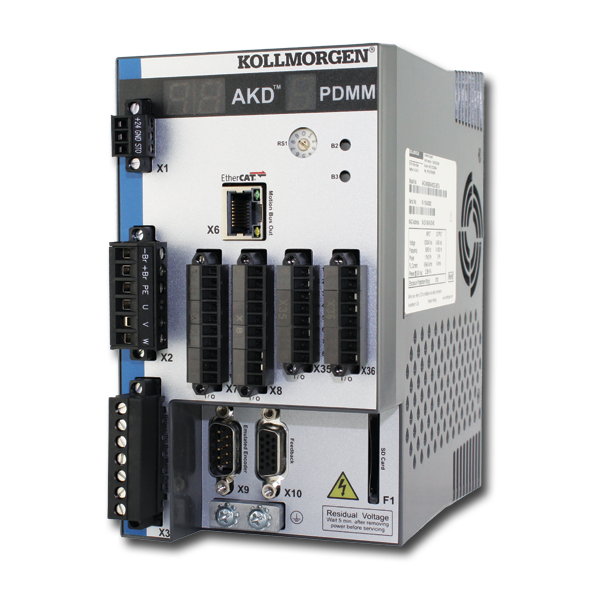
AKD PDMM
A component of the Kollmorgen Automation Suite, the AKD PDMM™ Drive Resident Controller combines an integrated AKD servo drive with an embedded motion controller that can control up to 64 axes, and the full automation capability of Kollmorgen Automation Suite™ in a single, compact package.
| Current Drive Firmware Version | 1.25.00.000 |
| Current Runtime Firmware Version | 4.05 R1 |
| Firmware Release Date | May 2026 |
| Firmware History & Downloads | KAS Associated Firmware by Release |
| Current Hardware Revision | EB |
| Part Number Scheme | Open the PDF |
| KAS-IDE Compatibility | v4.05 R1 and later |
| Current KAS-IDE Version | v4.05 R1 |
| Release Date | May 2026 |
| Model | Processor |
|---|---|
| AKD-M0xxxx-MCEC | 800 MHz single-core |
| AKD-M0xxxx-M1EC | 1.2 GHz single-core |
Interfaces
| Digital/analog I/Os | MultiFieldbus | Position output (encoder emulation) | Software interfaces | MultiFeedback |
|---|---|---|---|---|
|
|
See Protocols Supported by AKD Drives for more products |
|
| KAS v4.05 Software is now available! | English |  Prashanth…
 |
|
| Retrofit KAS EtherCAT Backups with AKD2G Firmware | English |  …
… |
|
| KAS v4.01 Software is now available!! | English |  dusty.…
 |
|
| Trade Compliance | English |  Bethany…
 |
|
| AKT and AKT2G Remote I/O Comparison | English |  C Wontrop
 |
|
| KVB HMI - Displaying Bitwise Variables in KVB / AKI2G | English |
C Wontrop |
|
| AKD2G Gantry Mode with KAS Controller | English |  Joe Parks Joe Parks |
|
| Getting Started with PxMM UDP Communications - using Packet Sender | English |
C Wontrop |
|
| MLFB_HomeFindHomeInput with additional features | English |
C Wontrop |
Although Windows displays this message and the limited functionality icon for the drive connection, your PC can communicate fully with the drive. This message and the icon are normal for an AKD to PC connection.
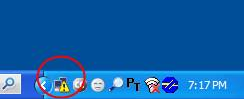
This is because you are using the Windows classic theme. To get a white background you must change the theme that Windows is using.
To change the theme go to the Control Panel, select Display, select the Themes tab, and choose a new theme, such as "Windows XP".
See Device not Shown in the Workbench Help for a detailed discussion of this problem.
If you are communicating through the Ethernet port at connector X11, you might not see your drive in the connect window for any of the following reasons:
- Poor cable connection. Make certain you have a good connection between your computer and the drive by checking to see if you see a blinking light next to the connector (at each end).
- Improper rotary switch setting. Make certain that the S1 and S2 rotary switches on the front of the drive are set to 0 (bottom position), unless you are attempting a point to point connection and your computer is set up to connect in this manner.
- Conflict with another device that is networked to your computer (including your wireless connection). In some cases, turning off your wireless card will fix this. You can turn your wireless card back on after you establish communication with the AKD).
- Improper TCP/IP settings. Make certain that the TCP/IP settings in the network port that you are communicating through are working properly.
In most cases, firmware is downloaded using WorkBench without setting the hardware into a specific “download” state. If you need to download firmware, but are unable to connect to WorkBench, use the procedure described in Forcing the drive into firmware download mode in the Workbench help.
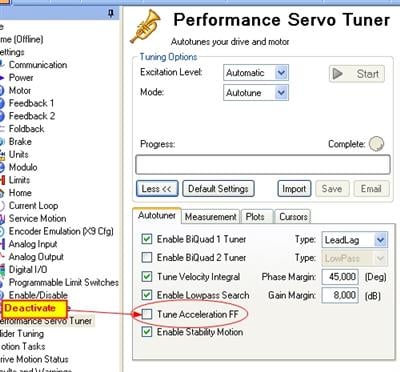
Autotuning of your application delivered unexpected results while tuning the current feed forward value. Please deactivate "Tune Acceleration FF" in the Workbench Performance Servo Tuner screen and restart the tuning.
Up to 500 s depending on the active current. See page Foldback Times.
5 seconds with Ipeak. Smaller currents can be sustained for longer periods. See Foldback Times.
There are two ways to find out about what parameter is behind a text box in Workbench.
- Right click on the text box and select Parameter Info from the menu. A popup appears next to the window selected. Note if you clicked the Help, you get taken to the page in the help system. Pressing F1 also does the same.
- Click the “Tell me more about this topic” link at the top of each page.