


 Accueil >
 Base de connaissances >
 FAQ >
FAQ > Téléchargements >
See Device not Shown in the Workbench Help for a detailed discussion of this problem.
Questions & Answers
The below represents frequent questions our support, engineering and sales teams have been asked over the years. If you have a question, please submit our contact us form to reach our application engineering team.
Why can't workbench find my drive on the network? >
Why can't I see my AKD drive when I try to connect in Workbench? >
If you are communicating through the Ethernet port at connector X11, you might not see your drive in the connect window for any of the following reasons:
- Poor cable connection. Make certain you have a good connection between your computer and the drive by checking to see if you see a blinking light next to the connector (at each end).
- Improper rotary switch setting. Make certain that the S1 and S2 rotary switches on the front of the drive are set to 0 (bottom position), unless you are attempting a point to point connection and your computer is set up to connect in this manner.
- Conflict with another device that is networked to your computer (including your wireless connection). In some cases, turning off your wireless card will fix this. You can turn your wireless card back on after you establish communication with the AKD).
- Improper TCP/IP settings. Make certain that the TCP/IP settings in the network port that you are communicating through are working properly.
What if I cannot connect to my drive using WorkBench, but I have been advised to download new firmware to the drive to fix the problem? >
In most cases, firmware is downloaded using WorkBench without setting the hardware into a specific “download” state. If you need to download firmware, but are unable to connect to WorkBench, use the procedure described in Forcing the drive into firmware download mode in the Workbench help.
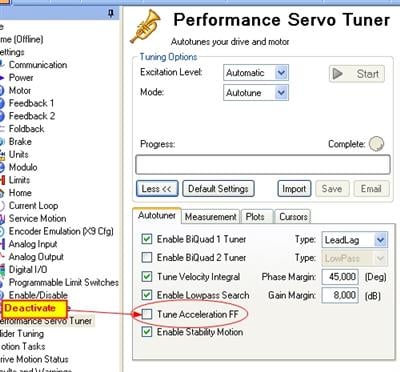
The drive is running rough and noisy after autotuning procedure. What can I do? >
Autotuning of your application delivered unexpected results while tuning the current feed forward value. Please deactivate "Tune Acceleration FF" in the Workbench Performance Servo Tuner screen and restart the tuning.
How long does it take until foldback is totally recovered? >
Up to 500 s depending on the active current. See page Foldback Times.
How long can the drive sustain a constant current above Icont before faulting? >
5 seconds with Ipeak. Smaller currents can be sustained for longer periods. See Foldback Times.
How do I view parameter information from Workbench screens? >
There are two ways to find out about what parameter is behind a text box in Workbench.
- Right click on the text box and select Parameter Info from the menu. A popup appears next to the window selected. Note if you clicked the Help, you get taken to the page in the help system. Pressing F1 also does the same.
- Click the “Tell me more about this topic” link at the top of each page.
How do I restore communication with the drive if I have lost communication and the IP address in the drive is 0.0.0.0.? >
First, check the LED on the RJ45 connector. If the LED is not illuminated, then no communication with the drive is possible. Possible causes for loss of communication with the drive include:
- The network cable is disconnected.
- A wiring problem exists between the drive and the network switch/hub.
- The switch/hub is not powered.
If the LED is lit and the IP address on the drive is 0.0.0.0, then the most likely problem is that the drive hardware has not detected a valid link.
Can we do dual loop with the dual-axis AKD2G? On both axes? If so, how? >
Yes, this is possible. Use either I/O (extension is included in Dual Axis) or use EtherCAT.
During the installation, a dialog box saying “Please wait while the installer finishes determining your disk space requirements” appears and never disappears. How do I remove this box? >
This problem is related to the MSI installer. You can resolve it as follows:
- Cancel the installation.
- Make sure that you have enough disk space on your hard disk (~500MB) to allow Windows .NET update if necessary. If you do not have enough disk space, then make additional space for the installation.
- Relaunch the installer (you may need to try this several times, the problem is random).
How many I/O does the AKD2G provide? >
The AKD2G provides up to 28 I/0.
- 16 I/O is standard for the single axis
- 28 I/O is standard for the dual axis
- An I/O expansion is available for the single axis model, which adds an additional 12 I/O on X22 for a total of 28 I/O.
Is the same GUI software used for programming the AKD2G and AKD? >
Yes, Workbench works both for the AKD and AKD2G, but parameters/programs are not transferrable from the AKD to the AKD2G at this point.
Is the STO on each axis of a dual-axis AKD2G, is it dual-channel STO? >
Yes, there is a dual channel STO for each axis in the drive.
Can you only use motors with a single cable for feedback/power with the AKD2G? >
No. The AKD2G is optimized for single cable motors but separate power and feedback two cable motors do work with the AKD2G. You need to order the SFA cable adapter or use X23.
Are the continuous/peak ratings of an AKD2G dual-axis drive a total for both axes, or rated per axis? >
The current rating of AKD2G is per axis, so a 3A continuous AKD2G dual axis has 3A continuous available for each axis.
Are the SFA and resolver a “safety rated solution” like the resolver is currently with it’s dual channels? >
No. Resolver is not offered as a “safe encoder” by Kollmorgen. You will need a digital safe encoder. The AKD2G offers H-DSL and EnDat 2.2 as safe solutions.
I want one axis to follow the other on a dual-axis AKD2G. How do I accomplish this? >
There are three possible solutions to this.
- Hardwiring I/O to X23
- Using EtherCAT
- Designing a dedicated control mechanism with MechaWare
Can we do dual loop with a single-axis AKD2G? How? Do we need X23? >
Can I do encoder emulation for both axes in the AKD2G dual-axis drive? If so, how? >
Yes, but you will have to use both I/O (for one axis) and X23 (for the other axis). This can be done via EtherCAT
Does AKD2G have encoder emulation output? >
Yes, you will need X22.