Home >
 Knowledge Base >
 FAQs >
 Downloads >
Rehoming in a Pipe Network application
Typically in many applications, homing motion is done first one each axis, then motion related to manual or automatic modes of operation is performed.
In the KAS pipe network, homing is typically done at the axis level with Axis block function calls before a pipe is connected to the axis block. Once a pipe is connected to the axis, the axis motion is a sum of the Axis motion plus the motion that comes through the pipe as shown here:
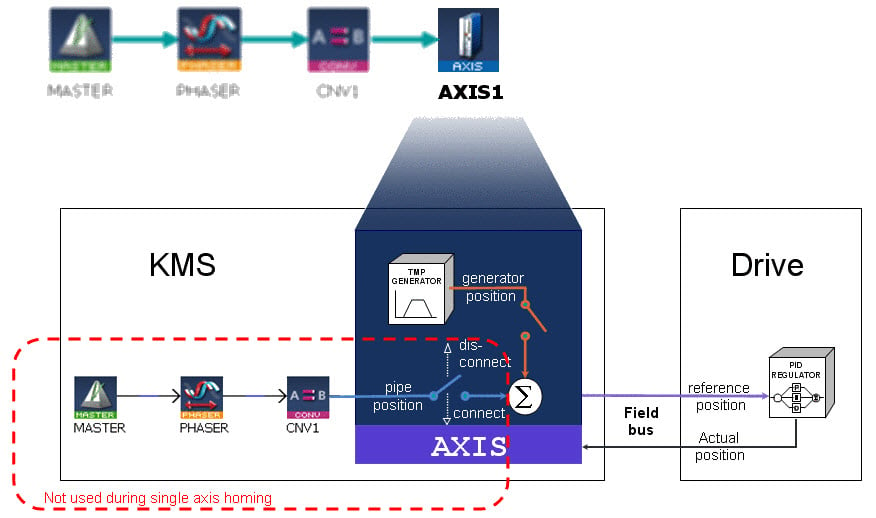
If rehoming, after the original homing and pipe motion has been commanded through a pipe by a MLMst, MLPmp, or MLSmp pipe blocks, care must be taking to account for the present position at the Axis block that comes through a pipe. Often this position will then be set to 0. For example, if after an initial home the MLMst block is used to command a position of 5000, when a rehome is done the pipe network position must be cleared or a 5000 offset will remain.
One method to eliminate the pipe position would be to include the following in the homing code:
- Before the homing move disconnect the pipe and force the Master position to 0. Example:
MLCNVDisconnect ( PipeNetwork.CNV1);
MLMstForcePos ( PipeNetwork.SMotion1,LReal#0.0 );
- After the homing move typically MLAxisWritePos can be called to reset the position, then reconnect the pipe using
MLCNVConnect ( PipeNetwork.CNV1, PipeNetwork.Axis1 );
More detail:
When re-homing, after the pipes have been connected:
1. Disconnect all pipes from the Axis Blocks using the MLCNVDisConnect function block
2. Force the master position to 0. Example: MLlMstForcePos(PipeNetwork.MASTER, LREAL#0.0);
3. Re-write the actual position of each axis using MLAxisWritePos, in order to reset the Pipe position of each axis
4. Reconnect the pipes. Example: MLCnvConnect(PipeNetwork.CNV_A1, PipeNetwork.AXI_A1_Axis);