Home >
 Knowledge Base >
 FAQs >
 Downloads >
How to configure a KAS application to use Multiple EtherNet/IP assemblies
The following steps describe how to configure multiple EtherNet/IP assemblies using two PDMMs. For the purpose of this example, the adapter PDMM will perform a loop back to the scanner PDMM.
Create the PLCOpen Adapter Application.
- Open the FieldBus Editor and create the Ethernet/IP Adapter network
- Insert the Master Port
- Insert a Slave/Data block, selecting the proper IO Object type, Instance, and Size. Repeat this step for each data block.

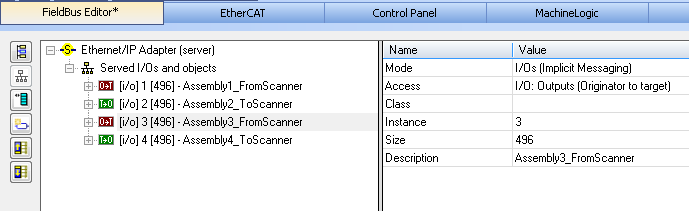
- Add a subprogram (EthernetIP) and variables to loop the received data back to the scanner

- Compile, download and run the adapter application.
Create the PLCOpen Scanner Application.
- Open the FieldBus Editor and create the EtherNet/IP Scanner network.
- Insert the Master Port, setting the IP Address of the Server to the IP address of the Adapter Controller
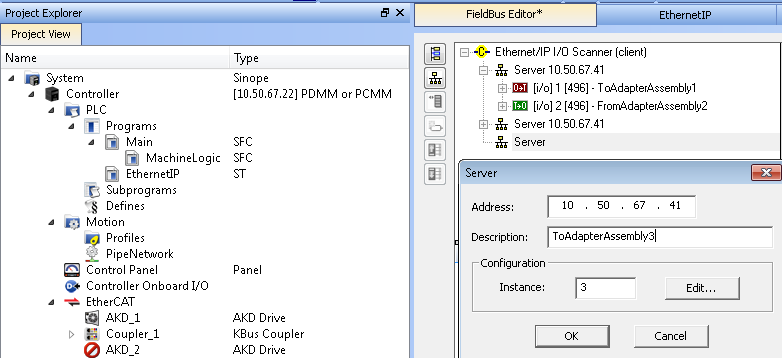
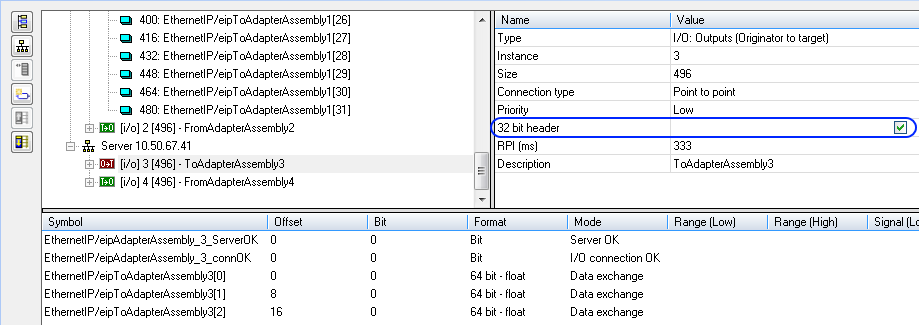
- For each assembly add the variables. NOTE: For the Originator to Target (O -> T) verify that the 32 bit header is enabled.
- Compile, download and run the scanner application.