Home >
 Knowledge Base >
 FAQs >
 Downloads >
Screw driver functionality with INxMODE30
Valid for S300, S700
Peak current (max torque) switch over via a digital input. Use mode 30 for the digital input.
Command sequences can be stored in the command buffers. All commands listed in the ASCII reference guide can be used. With the input function 30 (e.g. for Digital-In2: IN2MODE) the command sequence can be started via one of the digital inputs.
Program one of the digital inputs with the input function 30 first. Click the button "Edit Command List" and fill in the command sequence to the command lines on the page "Configure Command Buffer" for positive and/or negative transition of the input signal. An important parameter is TIME in ms
For deleting the command sequence fill in ECHO to the command line (default).
Example:
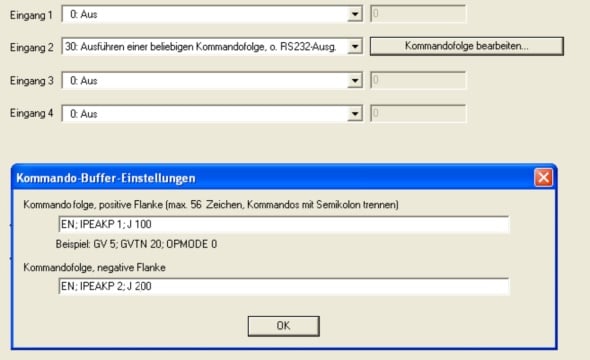
Positive transition:
| Enable | EN |
|
Peak Current Limit 1 A |
IPEAKP 1 |
|
Move with 100 rpm |
J 100 |
Negative transition:
| Enable | EN |
|
Peak Current Limit 2 A |
IPEAKP 2 |
|
Move with 200 rpm |
J 200 |