Home >
 Knowledge Base >
 FAQs >
 Downloads >
Restarting the PxMM Motion Engine when an Ethercat Fault occurs
The status of the Ethercat/motion Engine can be monitored with the MLMotionStatus function block. http://kdn.kollmorgen.com/webhelp/kas/#11.TechRefs/MLMotionStatus.htm?Highlight=MLMotion
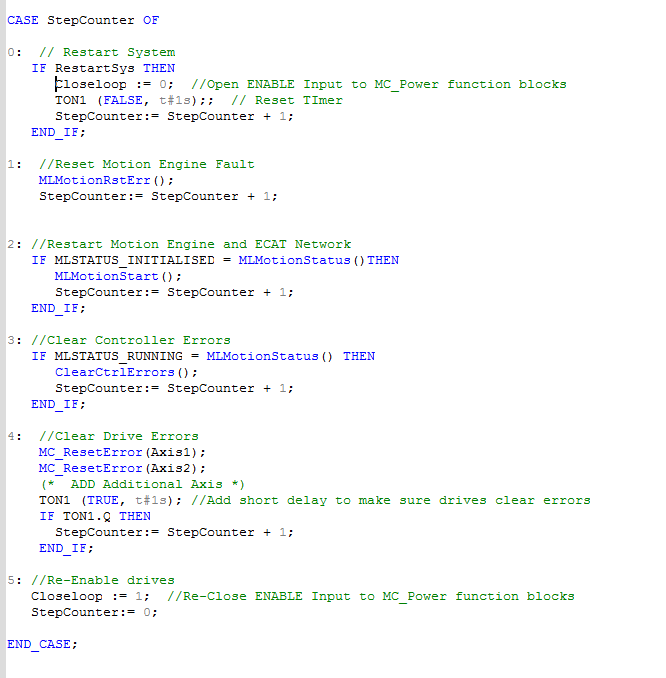
In a Project with the PLCopen Motion Engine, if the Ethercat Network goes down due to an Ethercat Network fault, the system can be restarted and any drive and controller errors cleared with the following code that:
- First resets the Motion Engine fault
- Then restarts the Motion Engine and Ethercat Network
- Then clears the Controller (PxMM) fault
- Then clears any drive side faults that may be active. A One second timer is added to give the drives time to clear the fault before enabling. As an alternative, the ErrorStop output from the MC_ReadStatus function block for each axis could be monitored.
- and finally will re-enables the drive by setting Closeloop = 1, which is tied into the MC_Power function block (example below from a KAS IDE 2 axis Template). In another application you may want to re-enable per the overall architecture of the code.
EXAMPLE: 2 axis application
Note: When restarting the Ethercat Network, re-executing other initialization code that create axes and cam profiles should not be done as this can adversely affect PxMM operation.
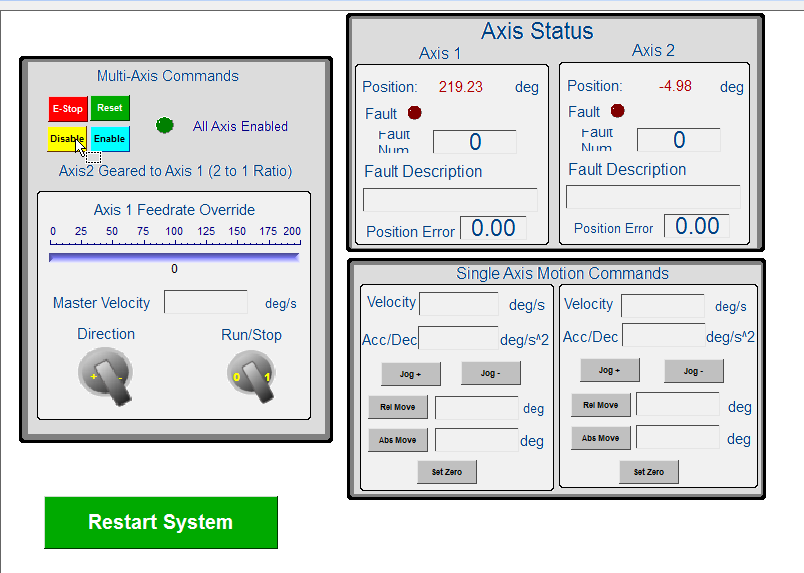
In the attached example project, the green Restart System button was added to the Control Panel and tied to the RestartSys variable