


 Home >
 Knowledge Base >
 FAQs >
 Downloads >
AKD and the Raspberry Pi
Raspberry Pi Foundation and its background.
The foundation's goal was to advance the Computer Science, Programming, and engineering education of children and adults with a low-cost and high-performance solution.
From Raspberry Pi Foundation itself:
“The Raspberry Pi is a low cost, credit-card sized computer that plugs into a computer monitor or TV, and uses a standard keyboard and mouse. It is a capable little device that enables people of all ages to explore computing, and to learn how to program in languages like Scratch and Python. It’s capable of doing everything you’d expect a desktop computer to do, from browsing the internet and playing high-definition video, to making spreadsheets, word-processing, and playing games.”
Raspberry Pi and the AKD
So how does it marry with our AKD servo drive? A Raspberry Pi can be used as an EtherCAT master, EtherNet/IP PLC, or Modbus TCP master. It’s a very versatile computer that is Linux-based and a very cost-effective way to do prototyping. The motion is limited to point-to-point moves. But, if you want to dive deeper into the Linux operating system, you can do a kernel patch and make the Raspberry Pi have Realtime capabilities. This enables Interpolated Positioning on the AKD. All this capability for $40. Adoption of the Raspberry Pi is slow in Industrial Automation, but it can provide solutions where low cost and simplicity are needed for motion applications. Some Raspberry Pi specifications are provided below.
It sounds like a dream, right? Low cost, highly capable hardware? However, the difficulty is that a lot of information is scattered due to the open-source nature of Linux and the highly specialized EtherCAT fieldbus. We have used Codesys* as a visual entry point to use the AKD with the Raspberry Pi. One can also use Simple Open EtherCAT Master (S.O.E.M)*, which is an embedded solution on certain applications.
*Codesys is one of many EtherCAT masters. Please ask for support via the Kollmorgen Community board. Alternatively, contact Codesys themselves as they created it.
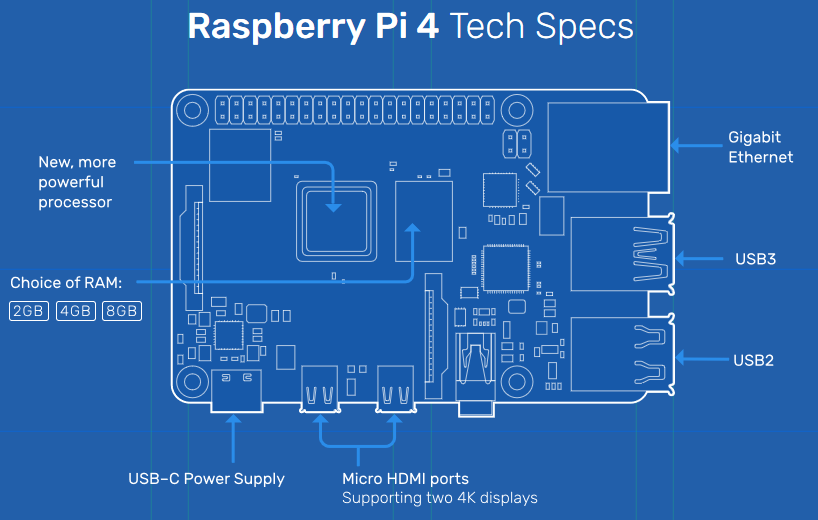
Raspberry Pi 4 Specs
(image: raspberrypi.org)
Broadcom BCM2711, Quad core Cortex-A72 (ARM v8) 64-bit SoC @ 1.5GHz
- 2GB, 4GB or 8GB LPDDR4-3200 SDRAM (depending on model)
- 2.4 GHz and 5.0 GHz IEEE 802.11ac wireless, Bluetooth 5.0, BLE
- Gigabit Ethernet
- 2 USB 3.0 ports; 2 USB 2.0 ports.
- Raspberry Pi standard 40 pin GPIO header (fully backwards compatible with previous boards)
- 2 × micro-HDMI ports (up to 4kp60 supported)
- 2-lane MIPI DSI display port
- 2-lane MIPI CSI camera port
- 4-pole stereo audio and composite video port
- H.265 (4kp60 decode), H264 (1080p60 decode, 1080p30 encode)
- OpenGL ES 3.0 graphics
- Micro-SD card slot for loading operating system and data storage
- 5V DC via USB-C connector (minimum 3A*)
- 5V DC via GPIO header (minimum 3A*)
- Power over Ethernet (PoE) enabled (requires separate PoE HAT)
- Operating temperature: 0 – 50 degrees C ambient
Comments
I have done some test/demo's including AKD and raspberry PI with:
- simple python scripts
- CodeSys EtherCat Master stack
- web applications visualized with the Raspberry Panel
Happy to share if interested!
My contacts can be found on oxni.ch