Home >
 Knowledge Base >
 FAQs >
 Downloads >
Integrating external encoder feedback in a PxMM application
This article outlines setting up a digitizing axis (secondary external encoder) or encoder master in a PxMM controller application that is using the PLCopen motion engine. The encoder input port is: AKD connector X9.
Acceptable formats for the master signal are:

Step 1
In the IDE Project setup a new Axis for the secondary external encoder:
Type : Digitizing
Address: EtherCAT address of the drive receiving the feedback on connector X9
User Units / Feedback Units : Number of User Units per Feedback Units coming from X9
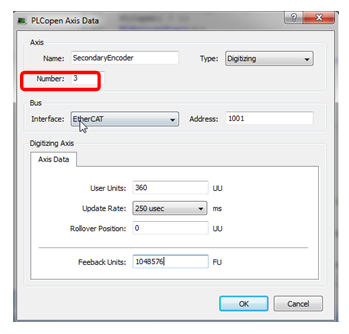
Step 2
Setup the Feedback resolution in Workbench
Resolution : In Workbench Feedback 2 screen, place the number of input counts you want to correspond to the Feedback Units number in the PLCopen Axis Data screen. Save the new setting to the drive.
In the PLCopen Axis Data Screen, the default Feedback Units number is 1048576 and only needs to be changed when there is Non-Integer Feedback Units. For more details https://kdn.kollmorgen.com/webhelp/kas/#8.AdvancedTopics/DigitizingAxis_NonINT_FUs.htm?Highlight=Digitizing: In the example below 1000 input counts scales to 1048576 Feedback Units:
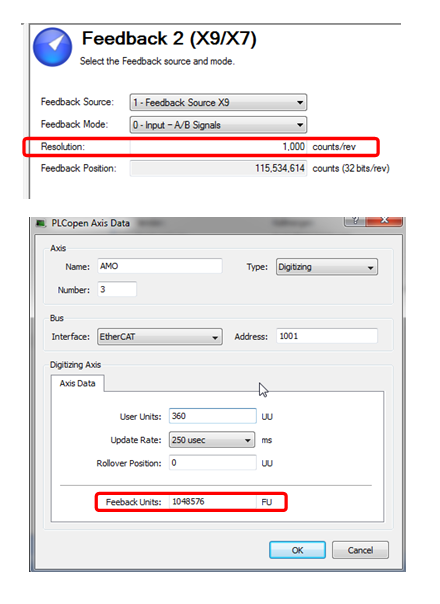
(Note = Resolution is AKD parameter FB2.ENCRES)
Step 3
To read the move distance in a KAS project use the function block MC_ReadActPos
Note: to complete the axis definition in the project, after the PLCopen Axis Data has been filled in there needs to be an Axis_Ref library function instance added to the Dictionary. Example:
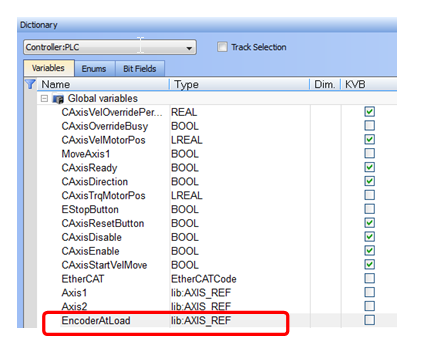
And a connection to the Axis Number in the PLCopen Axis Data Screen must be added to the program. Example:
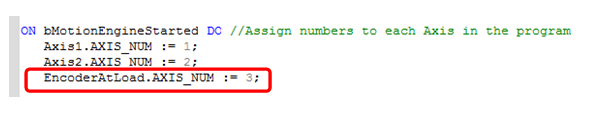
Step 4
To calculate the Move Distance (in PLCopen user units) by the secondary PDMM/AKD X9 feedback device:
Move Distance (UU) = ((AA Input pulses / Resolution) x (1048576)) x (User Units /Feedback Units)
User Units and Feedback Units must be entered in integer values. If for example the User Units turns out to be non-integer number such as 1.32 to compensate for this then User Units can be set to 132 and Feedback Units to 104857600
Also the top value that can be entered in for Resolution is 262,140. If you have a high resolution feedback device where there is > 262,140 pulses per xx User units, you can modify Feedback Units to compensate. For example, doubling the Feedback Units will allow cutting the Resolution in half.
For more detail on this subject: https://kdn.kollmorgen.com/webhelp/kas/#8.AdvancedTopics/DigitizingAxis_SetUp.htm%3FTocPath%3DAdvanced%2520Topics%7CMotion%2520Techniques%7CWorking%2520With%2520A%2520Digitizing%2520Axis%2520in%2520PLCopen%7C_____0
https://kdn.kollmorgen.com/content/external-encoder-kas-pdmm-project