Home >
 Knowledge Base >
 FAQs >
 Downloads >
AKD and EtherCAT CSV Mode
General Information
With this EtherCAT Opmode, the trajectory generator is located in the control device, not in the AKD drive. In cyclic synchronous manner, the EtherCAT master provides a target velocity to the drive, which performs velocity control and torque control. If desired, the position control loop may be closed over EtherCAT. Optionally, additive velocity and torque values may be provided by the control system in order to allow a second source for velocity and/or a torque feed forward. Measured by sensors, the drive device may provide actual values for position, velocity and torque to the control device.
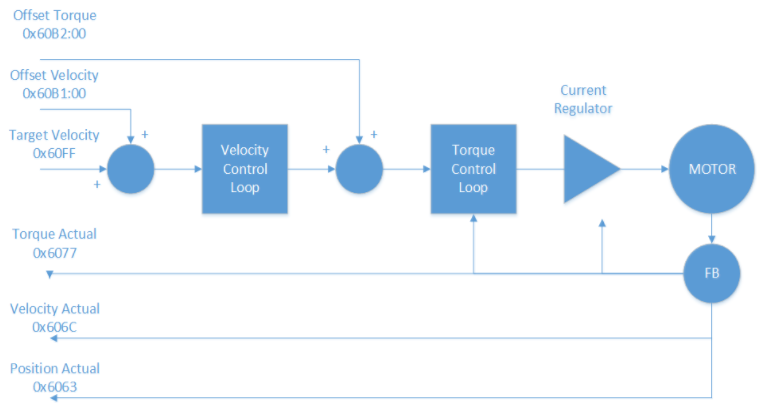
In this suggested setup of a Kollmorgen AKD for CSV mode, I will be using the EtherCAT Master run-up, from PREOP to OP mode, to setup the drive's configuration. In the chart below some parameters (as noted) can be set either in Workbench or by SDOs from the Master using the object number and subindices.
Note: PDO mapping or setting the Modes of Operation must be done by the EtherCAT master.
These cannot be done using Workbench or parameters saved in the drive.
In order to map your PDOs or setting the Modes of Operation from the EtherCAT master (method controller dependent) send SDOs when the EtherCAT master starts up
use one of the following methods:
- Using the Startup/Init script (a list of SDO that are sent at PREOP->SAFE OP). Note some EtherCAT masters have a PDO mapping tool in their IDE.
- Edit the ESI file for EtherCAT masters that do not have a tool for PDO mapping and/or a Startup/Init for the necessary PDO content and modes of operation for the application. Note the ESI file defaults to 7-Interpolated Position Mode.
In my examples: My velocity command resolution is in 1/10 of a RPS (Rev per second). Example: A command of 20 will result in 2 RPS or 120 RPM command in the drive. My position feedback resolution is 2^20 count/rev and is set by AKD parameter FB1.PSCALE.
CSV using fixed mapping of CoE Objects:
| Index | Data | Description |
|---|---|---|
| 0x1C12:00 | 0x00 (0) | Clear SM PDO |
| 0x1C13:00 | 0x00 | Clear SM PDO |
| 0x1C12:01 | 0x1702 | Set fixed RXPDO map |
| 0x1C12:00 | 0x01 | One item mapped |
| 0x1C13:01 | 0x1B01 | Set fixed TXPDO |
| 0x1C13:00 | 0x01 | One item mapped |
| 0x6060:00 | 0x09 | Opmode = CSV |
| 0x60C2:01 | 0x02 | Interpolation time period |
| 0x60C2:02 | 0xFD | Interpolation time index |
| 0x36E9:00 | 0x90 | FBUS.PARAM05 = 144 |
| 0x204C:01 | 0x01 | DS402.VELSCALENUM = 1 |
| 0x204C:02 | 0x0A | DS402.VELSCALEDENOM = 10 |
CSV using flexible mapping of CoE Objects
| Index | Data | Description |
|---|---|---|
| 0x1C12:00 | 0x00 | Clear RXPDO mapping |
| 0x1C13:00 | 0x00 | Clear TXPDO mapping |
| 0x1A00:00 | 0x00 | Clear 0x1A00 PDO |
| 0x1A00:01 | 0x60630020 | Set position feedback |
| 0x1A00:02 | 0x60410010 | Set status word |
| 0x1A00:00 | 0x02 | Two items mapped |
| 0x1A01:00 | 0x00 | Clear 0x1A01 PDO |
| 0x1A02:00 | 0x00 | Clear 0x1A02 PDO |
| 0x1A03:00 | 0x00 | Clear 0x1A03 PDO |
| 0x1600:00 | 0x00 | Clear 0x1600 PDO |
| 0x1600:01 | 0x60FF0020 | Set Vel cmd |
| 0x1600:02 | 0x20400010 | Set control word |
| 0x1600:00 | 0x02 | Two items mapped |
| 0x1601:00 | 0x00 | Clear 0x1601 PDO |
| 0x1602:00 | 0x00 | Clear 0x1602 PDO |
| 0x1603:00 | 0x00 | Clear 0x1603 PDO |
| 0x1C12:01 | 0x1600 | Set PDO |
| 0x1C12:00 | 0x01 | One RXPDO set |
| 0x1C13:01 | 0x1A00 | Set PDO |
| 0x1C13:00 | 0x01 | One TXPDO set |
| 0x6060:00 | 0x09 | Opmode = CSV |
| 0x60C2:01 | 0x02 | Interpolation time period |
| 0x60C2:02 | 0xFD | Interpolation time index |
| 0x36E9:00 | 0x90 | FBUS.PARAM05 = 144 |
| 0x204C:01 | 0x01 | DS402.VELSCALENUM = 1 |
| 0x204C:02 | 0x0A | DS402.VELSCALEDENUM = 10 |
Note 1: Recommend tuning the AKD in velocity mode before attempting to connect with an EtherCAT master.
Note 2: If closing the position loop in the EtherCAT master, best performance if AKD's VL.KI or the EtherCAT Master's position integral gain is set to "0". You can not have two integrators in series.
Note 3: Position loop proportional gain and velocity loop integral gain have the same impact on phase margin (stability). When increasing the position loop proportional gain, you may need to decrease the AKD's VL.KI gain to reduce overshoot and/or oscillations.