Home >
 Knowledge Base >
 FAQs >
 Downloads >
Electronic Gearing with overlay motion tasks
Valid for S400, S600 with FW 6.21...6.99
With operation mode 4 (OPMODE 4, electronic gearing) the axis follows synchronously to a master position. The gearing ratio can be adjusted with GEARI and GEARO.
Electronic gearing can be superposed with motion tasks by using the ASCII command CAMMCTRL = 256 (see diagram).
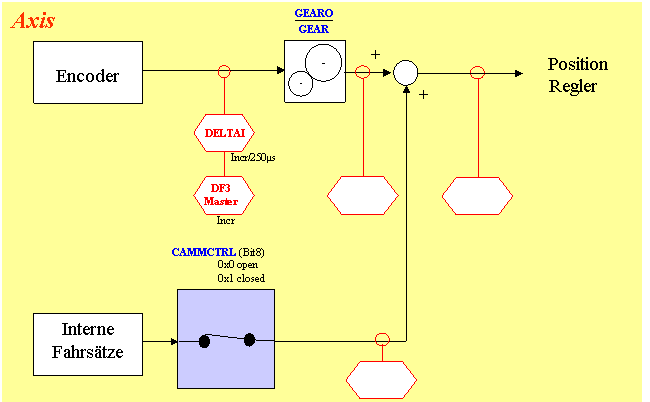
The motion task must be defined first with user units or internal counts. Generally all motion tasl types are allowed. Practically, however, the motion task type REL-IST should be selected.
Setting the ASCII parameter CAMMCTRL to 256 enables the user to start motion task OPMODE 4, e.g. using a digital input or a fieldbus.
With linear and modulo axes, analog to OPMODE 8 (Motion Task Positioning), the reference point must be known, before the motion task can be started.
Starting a reference traverse (homing) is possible with CAMMCTRL = 256 in OPMODE 4, therefore switching over the OPMODE isn't necessary.