


 Home >
 Knowledge Base >
 FAQs >
 Downloads >
Troubleshooting Array Indexing Problems/PiC900 Data Memory Map
This article refers to G&L PiC application note AN000028 and covers how to troubleshoot array indexing problems and describes the memory map for the PiC900 Data variables. One common problem when using arrays in the PiC900 is indexing beyond the end of the array into another area of memory. The PiC900 does not check to see if the array index is larger than the size of the array. Thus if your index exceeds the array size you will index into another data variable.
The data variables are assigned memory addresses in the order that they are declared in the software declarations with the following guidelines.
-
All retentive variables will be assigned addresses first.
-
The digital I/O image addresses are assigned second. Note: At the start of the ladder scan the PiC900 reads all of the discrete inputs and writes the input values into the data memory. At the end of the ladder scan the PiC900 reads all of the output values from the data memory and writes them to output modules.
-
All remaining data variables are assigned addresses in the order that they were entered in the software declarations.
On the following page is a copy of a sample software declaration table followed by the memory map on how they will be stored in the PiC900. As you can see the retentive variables CYCLECNT and SETUP are assigned the first memory addresses followed by memory image of the I/O and then remaining data variables.
Sample Software Declaration Table
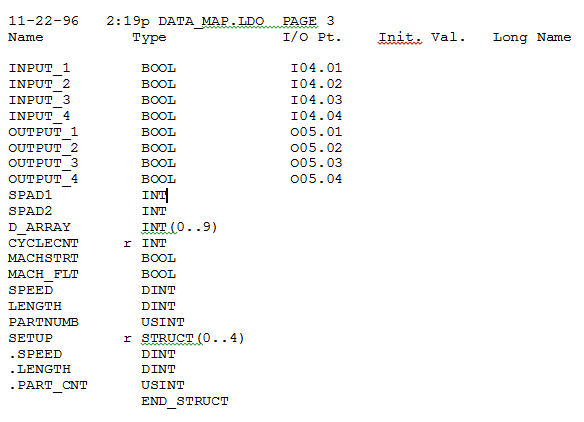
Software Declaration Table Memory Map
|
Variable |
Variable |
Assigned Memory Address In Data Memory (Bytes) |
|---|---|---|
|
CYCLECNT |
INT |
0-1 |
|
SETUP(0).SPEED |
DINT |
2-5 |
|
SETUP(0).LENGTH |
DINT |
6-9 |
|
SETUP(0).PART_CNT |
USINT |
10 |
|
SETUP(1..3).SPEED SETUP(1..3).LENGTH SETUP(1..3).PART_CNT |
DINT DINT USINT |
11-37 |
|
SETUP(4).SPEED |
DINT |
38-41 |
|
SETUP(4).LENGTH |
DINT |
42-45 |
|
SETUP(4).PART_CNT |
USINT |
46 |
|
INPUT_1 |
BOOL |
47 |
|
INPUT_2 |
BOOL |
48 |
|
INPUT_3 |
BOOL |
49 |
|
INPUT_4 |
BOOL |
50 |
|
OUTPUT_1 |
BOOL |
51 |
|
OUTPUT_2 |
BOOL |
52 |
|
OUTPUT_3 |
BOOL |
53 |
|
OUTPUT_4 |
BOOL |
54 |
|
SPAD1 |
INT |
55-56 |
|
SPAD2 |
INT |
57-58 |
|
D_ARRAY(0) |
INT ARRAY |
59-60 |
|
D_ARRAY(1) |
INT ARRAY |
61-62 |
|
D_ARRAY(2..7) |
INT ARRAY |
63-74 |
|
D_ARRAY(8) |
INT ARRAY |
75-76 |
|
D_ARRAY(9) |
INT ARRAY |
77-78 |
|
MACHSTRT |
BOOL |
79 |
|
MACH_FLT |
BOOL |
80 |
|
SPEED |
DINT |
81-84 |
|
LENGTH |
DINT |
85-89 |
|
PARTNUMB |
USINT |
90 |
When there is an array indexing problem, it usually affects the data variables immediately below the array. For instance, if the ladder tried to write to D_ARRAY(10), the two BOOL’s MACHSTRT and MACH_FLT would be affected since they are the next two bytes after the D_ARRAY. If the ladder tried to write to D_ARRAY(11), the variable SPEED would be affected. If the ladder was indexing past the end of the SETUP structure the inputs and outputs would be affected.
The following are some notes on troubleshooting array indexing problems:
-
The symptoms of array index problems are that data variables change even though the ladder is not writing to them directly.
-
Another symptom is that discrete inputs are on/off when the physical input is off/on. Or discrete outputs are on/off when the ladder is trying to turn them off/on.
-
When you index past the end of an array it affects variables after the array in memory.
-
If the index is very large, i.e. D_ARRAY(65635), you can change variables above the array, since the data memory segment is 64K bytes the index wraps around to the top of the memory segment.
-
Make sure that all array index’s are initialized before you use them. For instance if the ladder was indexing into the SETUP structure using the variable PARTNUMB, i.e. SETUP(PARTNUMB).SPEED make sure that PARTNUMB contains a valid number. Note: The LIMIT function can be used to limit the range of a number.
-
When using loops and variable array indexes make sure that the index is set to a valid index after the loop. For example, at the start of a batch we want to clear out all of the values in the D_ARRAY. The ladder sequence is as follows:
a. Set the index variable PARTNUMB to zero.
b. Move a zero into D_ARRAY(PARTNUMB).
c. Add one to PARTNUMB.
d. If PARTNUMB is less than 10 loop back to step b.
e. Set the index variable PARTNUMB to zero.
If you leave PARTNUMB at 10 and use it later in the program you will index beyond the end of the array. -
Use temporary jumps in your program to determine where the indexing problem is. For example, put a jump in the middle of the ladder to jump to the end. If the problem goes away, move the jump down in the ladder. Keep moving the jump up and down until you have isolated the networks that are causing the problem. Keep cutting the ladder that is being jumped around in half to quickly isolate the problem.
-
BOOL array’s are evaluated whenever they are scanned, not just when they are turned on, off, set, or reset. This is because the transitional states are evaluated even if the logic leading to the BOOL does not cause it to change state. Thus, all index’s for BOOL array’s have to be valid all of the time.