Home >
 Knowledge Base >
 FAQs >
 Downloads >
Switching Between Two Command Sources and Operation Modes in the AKD Using a Digital Input
In the AKD drive, a digital input can be configured for mode #22 (DINx.MODE=22) – “Switch Cmd Source/OpMode” and used to switch between two configurations of Command Source and Operation Mode.
Settings
Step 1: Configure the command source that you want to start with when the drive boots up. This is selected in the main toolbar.

Step 2: Configure the digital input with the command source and opmode that you want to switch to when the input is turned on. The configuration for the digital input contains the “other” or “secondary” selection.
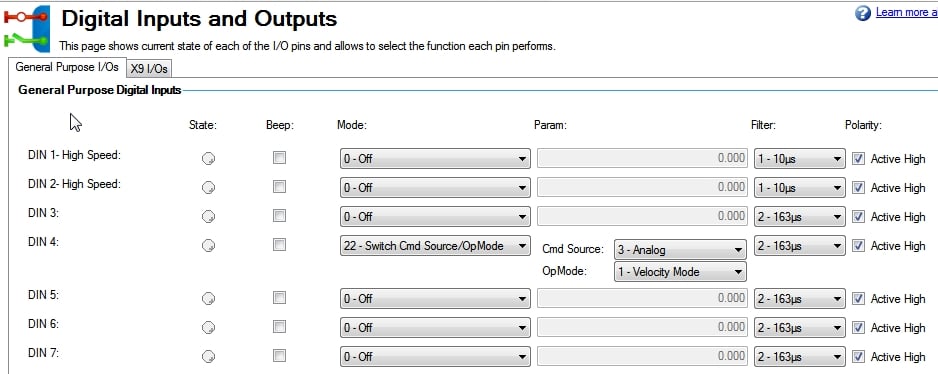
Description
When the digital input is turned on, the drive will switch to the chosen (secondary) command source and operation mode. When the digital input is turned off, it will switch back to the original command source and operation mode.
To ensure that the drive will boot up with the correct command source and operation mode, make sure the appropriate modes are selected on the toolbar when the parameters are saved to NV memory. Note that if you turn on the digital input to switch modes and then save the parameters to NV memory, the drive will now boot up with the same modes that the digital input is configured to switch to, resulting in the digital input performing no action.
Applications
Some applications using Electronic Gearing (position mode) or Analog Position mode require that the motor be homed prior to running. Since the AKD can’t perform a homing function while the command source is set to Electronic Gearing or Analog, it is necessary to switch the command source to Service for homing. The best practice for this type of application is to configure the drive such that it boots up in Service Position mode, and then use a digital input to switch to another mode after homing is complete.


When switching to a command source of “Service”, the initial function will always be to not command any motion (zero torque, zero speed, or hold position). When switching into Analog or Electronic Gearing, keep in mind that the motor will move immediately if a command is present.
Example: Starting in Analog Velocity and switching to Analog Torque.