Home >
 Knowledge Base >
 FAQs >
 Downloads >
Stopwatch Function Block KAS
Attached StopWatch Sample.kas project demonstrates how to use new function block Stopwatch added in the 5.00 release of KAS IDE software. Stopwatch is used in the FaultMonitor Structured Text project.
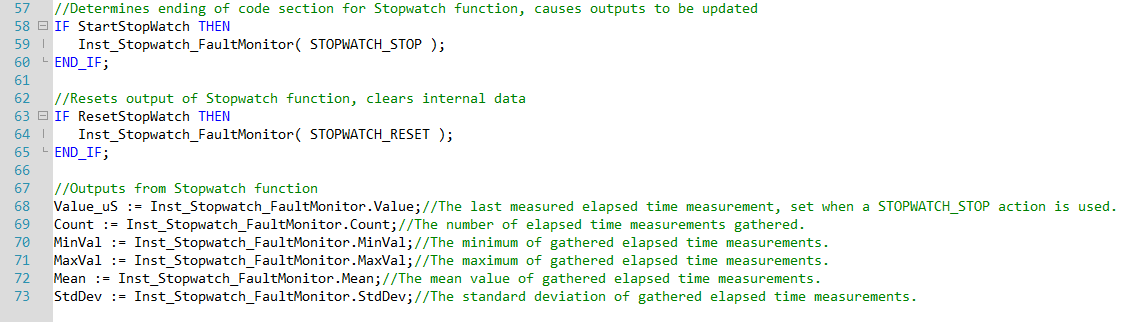
Stopwatch function block is started in line 10 of the FaultMonitor program when the local variable StartStopWatch variable is True. Can be set from the Watch Window or Dictionary. The constant "STOPWATCH_START" causes data to start being collected.

The Stopwatch is stopped on line 59 of the FaultMonitor program. The constant "STOPWATCH_STOP" determines the end of the timed code and is when the outputs of the Stopwatch function block are updated. The constant "STOPWATCH_RESET" can be called on line 64 with the local variable "ResetStopWatch". This will cause the outputs of Stopwatch function block to be reset and internal data cleared.
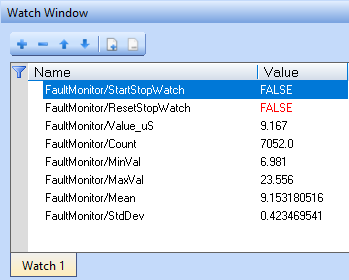
The variables used to trigger starting the Stopwatch function block and resetting it are added to the project's Watch Window, as well as all of the outputs of the function block including the latest timed value, number of time measurements used to calculate outputs, minimum value, maximum value, mean value, and standard deviation.