Home >
 Knowledge Base >
 FAQs >
 Downloads >
Save Variable Values to PDMM SD memory
The attached sample .kas project contains a program (SaveVarsToSDcard) that stores application variables in a .csv file on the PDMM SD card:
//Load variable names (VAR1,VAR2,VAR3, and VAR4) from file on development PC
ON FileConnect DO
ID_LogFile := VLID ('c:\MyFileTest.txt');
END_DO;
//Store variable values to a csv file on the PDMM SD card
rStart(Execute);
IF Done AND NOT Execute THEN
Done := FALSE;
END_IF;
IF rStart.Q OR Active THEN
CASE iStepCounter OF
0:
Active := TRUE;
iStepCounter := 1;
1:
SD_MOUNT();
IF SD_ISREADY() THEN
iStepCounter := 2;
END_IF;
2:
ID := F_WOPEN('//SDCard/file2');
iStepCounter := 3;
3:
MyLog (1, RST, ID_LogFile, '//SDCard/file1');
IF MyLOG.Q THEN
Q := MyLOG.Q;
ERR := MyLog.ERR;
MyLog (0, RST, ID_LogFile, '//SDCard/file1');
iStepCounter := 4;
END_IF;
ERR := MyLog.ERR;
4:
F_CLOSE(ID);
iStepCounter := 98;
98:
SD_UNMOUNT();
iStepCounter := 99;
99:
Done := TRUE;
Active := FALSE;
END_CASE;
ELSE
iStepCounter := 0;
END_IF;
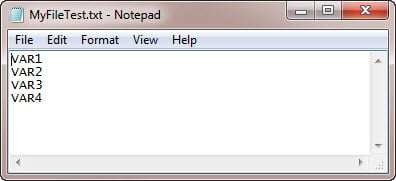
The VLID function is used to import a list of variables(VAR1,VAR2,VAR3, and VAR4) to store:
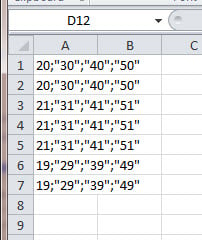
Then the store to the SD card is accomplished by the LogFileCSV function. The following example shows 7 sets of data saved.
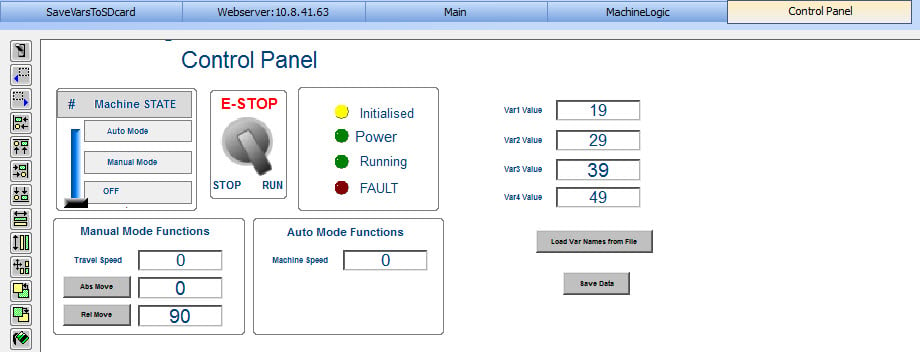
The attached project contains added controls on the control panel (right side) to execute each data save:
The file can then be read by removing the SD card from the PDMM and plugging it into a SD port on another computer.