


 Home >
 Knowledge Base >
 FAQs >
 Downloads >
Reading of AKD axes position by Python and Raspberry Pi 3 Modell B
This solution allows you to read the motor positions of three AKD axes using Raspberry Pi hardware and Modbus TCP/IP.
There is nothing to do on the AKD drive, the minimum request is to set up different IP addresses.
On the Raspberry Pi you need to install the following.
- Python
- A Python editor such as Thonny
- add Modbus TCP functions by installing pyModbusTCP
Refer to https://pypi.org/project/pyModbusTCP/ for more information.
In this example, the AKD drive addresses are 192.168.0.1, 192.168.0.2, and 192.168.0.3.
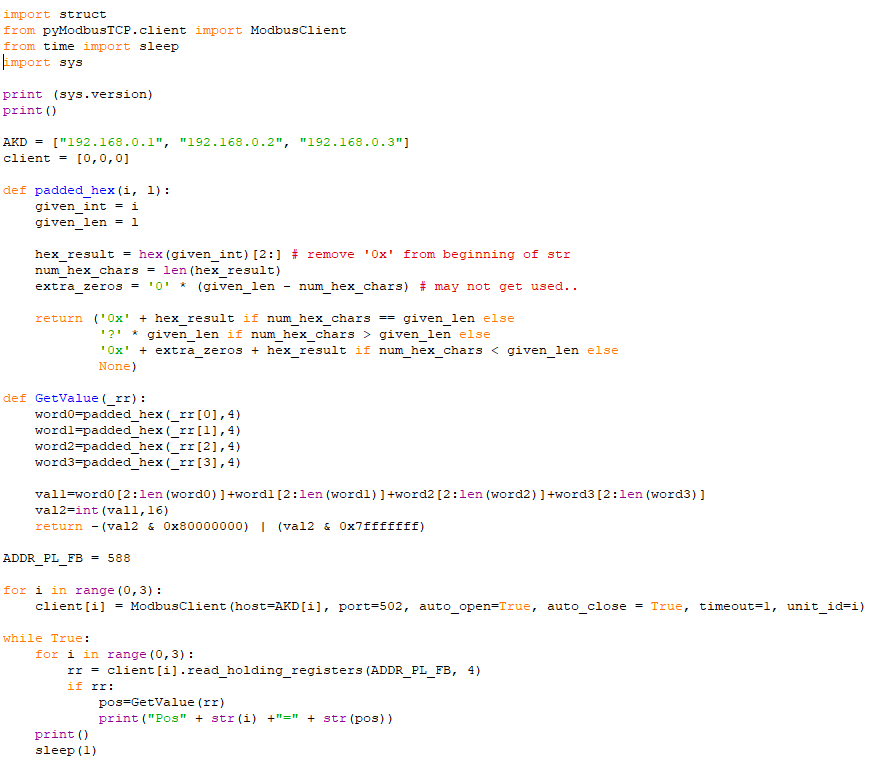
ADDR_PL_FB is the Modbus address of the parameter PL.FB, axis position.
This is the very simple code:
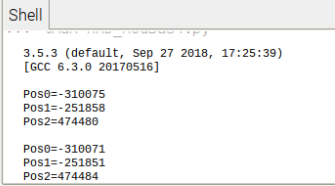
Run the project and the output will be:

Comments
Can you please provide any python program/sdk/api/library to control the drive? I've used this script. Now I can only read the position value. I want to run the motor by using this kind of script. My AKD drive model is AKD-P00606-NBAN-0000 and motor model is AKM31H-ACMN2-00. Can you please help on this?
Thank you in advance.
For enabling all the drives:
ADDR_DRV_EN = 254
for i in range(0,3):
rr = client[i].write_multiple_registers(ADDR_DRV_EN, [1])
For disabling all the drives:
ADDR_DRV_DIS = 236
for i in range(0,3):
rr = client[i].write_multiple_registers(ADDR_DRV_DIS, [1])
For writing the parameter DRV.DEC to the third drive:
DRV.DEC = 230
rr = client[2].write_multiple_registers(ADDR_DRV_DEC, [0,0,15,4240]) #1000000
Each parameter address can be found inside the Workbench Help
Thanks a lot for your kind response. I've tried to create motion task using your sample script. The motion task creation is successful. But there's one problem about the value. I couldn't understand how did you calculate [0,0,15,4240]) for 1000000? That's why I can not set the expected value in motion task table. Can you please share the way of calculation of those values. I'm attaching two screenshots what I've implemented. Motion task number 3 was created using the following python script.
Another question is about giving command to run the motor without creation of motion task. Can I give the drive a command to go to a specific position with specific velocity, acceleration, deceleration and motion profile like s-curve without creation of motion task?
MODBUS.SCALING 1 // modbus specific
MODBUS.PSCALE 16 // 16 bits per motor turn = 65536 counts
MODBUS.PIN 1 // counts per motor turn (internal)
MODBUS.POUT 1 // counts per motor turn from modbus
UNIT.PIN 65536 // counts per motor turn
UNIT.POUT 1
UNIT.PROTARY 3 // counts (16bits per motor turn)
UNIT.VROTARY 3 // counts/s
UNIT.ACCROTARY 3 // counts/s2
You are right, it's my mistake.
hex(1000000)=0x000F4240
The right values are 15=dec(0xF) and 16960=dec(0x4240)
DRV.DEC = 230
rr = client[2].write_multiple_registers(ADDR_DRV_DEC, [0,0,15,16960]) #1000000
I was able to create the motion tasks via Modbus communication. But there's one problem is that there is no way to see the faults if it occurs. I want to check the drive in a regular interval if any fault is occurred. Till now I know that it's not possible using Modbus protocol.
In workbench software we can easily see the faults if it happens. Can you please help me to implement any of these: i)reading position , ii)creating a motion task or, iii)checking faults using Ethernet/IP fieldbus communication protocol?
The following table show the ModBus addreses of the actual fault. You can read DRV.FAULT1 if <> 0
Got it. Thanks a lot. I've also tried telnet protocol. That also works. Now I can communicate via two communication protocol separately. Thank you.