


 Home >
 Knowledge Base >
 FAQs >
 Downloads >
PiCPro / PiCServoPro Directory Structure
This document refers to Giddings & Lewis PiC application note AN000025 and describes one method of maintaining several versions of PiCPro/PicServoPro on your computer. The two areas that will be covered are the directory structure and batch files for changing between versions.
Directory Structure
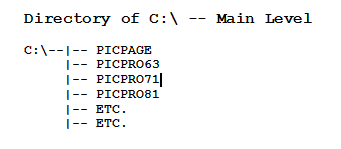
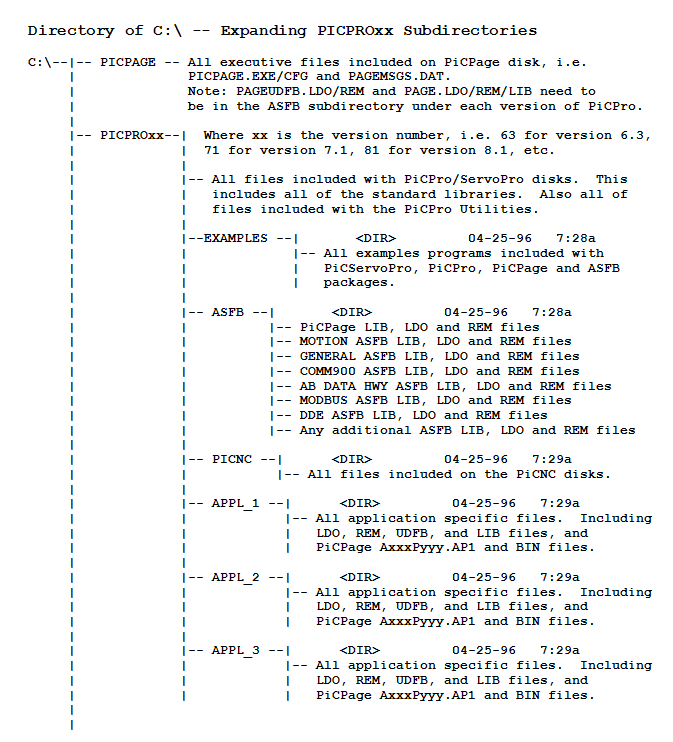
Each version of PiCPro will have its own directory and subdirectories for the ASFB’s and applications. The directory structure is as follows.


PiCPro Batch Files
Each version of PiCPro will have its own batch file to setup the path and piclib, and to change the directory to the appropriate PiCPro directory. The following are the three batch files for PiCPro8.1, 7.1, 6.3.
PICPRO81.BAT
path c:\dos;c:\;c:\picpro81;c:\picpage;c:\etc.
set piclib=c:\picpro81;c:\picpro81\asfb
cd\picpro81
PICPRO71.BAT
path c:\dos;c:\;c:\picpro71;c:\picpage;c:\etc.
set piclib=c:\picpro71;c:\picpro71\asfb
cd\picpro71
PICPRO63.BAT
path c:\dos;c:\;c:\picpro63;c:\picpage;c:\etc.
set piclib=c:\picpro63;c:\picpro63\asfb
cd\picpro63