


 Home >
 Knowledge Base >
 FAQs >
 Downloads >
KAS IDE Crashes On Startup
Does KAS IDE crash on your system before displaying the splash screen, displaying this instead:
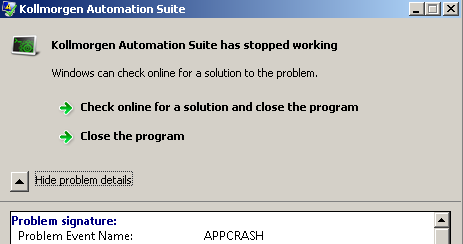
This is likely due to a Potentially Unwanted Program (PuP for short), installed on your computer.
Such programs can cause KAS to crash on startup by using a Windows feature that allows a DLL to be pre-loaded when running almost ANY application.
This technique is often (but not exclusively) used by malware. It is described here: http://support.microsoft.com/kb/197571
To find the program that is causing KAS to crash on startup, open RegEdit and search for the key "AppInit_DLLs" under the key below:
[ HKEY_LOCAL_MACHINE\SOFTWARE\Microsoft\Windows NT\CurrentVersion\Windows ]
On 64 bit system, AppInit_DLLs will also be under this key:
[ HKEY_LOCAL_MACHINE\SOFTWARE\Wow6432Node\Microsoft\Windows NT\CurrentVersion\Windows ]
If the value of "AppInit_DLLs" is not blank, then check the value of the key "LoadAppInit_DLLs", in the same folder as "AppInit_DLLs".
If "LoadAppInit_DLLs" is 1, then set the value to 0.
On 64 bit Windows OS, change the value of "LoadAppInit_DLLs" in both locations if necessary.
After the changes have been made, exit RegEdit.
If KAS starts after setting the "LoadAppInit_DLLs" values to 0, then one or more of the DLLs listed in "AppInit_DLLs" was causing the crash.
If you can figure out which product owns the offending DLL, try uninstalling it.
Then run a virus scanner to remove any remnants. The free version of MalwareBytes is available here: https://www.malwarebytes.org/downloads/
After running the virus scanner, perform the following verifications in RegEdit:
1) The value of all "AppInit_DLLs" keys should be blank. If not, verify that the DLLs are truly wanted.
2) The value of all "LoadAppInit_DLLs" keys should be 0 (unless the DLLs listed in "AppInit_DLLs" are wanted.)
3) If the key "RequireSignedAppInit_DLLs" exists, it's value should be 1 (unless the DLLs listed in "AppInit_DLLs" are wanted.)