


 Home >
 Knowledge Base >
 FAQs >
 Downloads >
External Encoder with KAS (PDMM) Project
In a PLCopen project you can create a new axis for an Encoder master. In the axis setup popup screen, change the type to Digitizing, change the interface to EtherCAT, and the address to be 1001 if the encoder is going to be connected to the PDMM which is the first EtherCAT device (or 1002 for the second, 1003 for third, and so on)
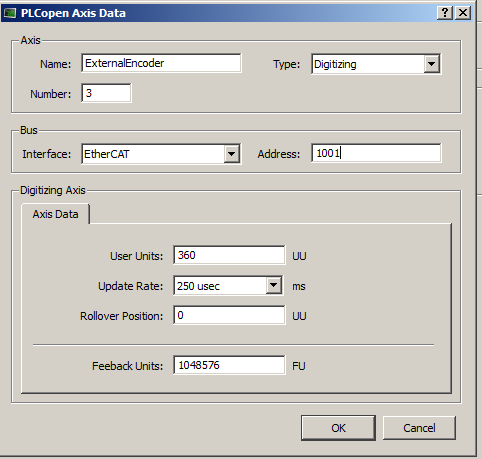
You can then create a new Axis_ref variable in your dictionary and assign the axis number to the same as the digitizing axis (from the above setup screen it would be 3). You can then use many of the built in PLCopen functions with this encoder axis. MC_ReadActPos and MC_ReadActVel will work, and you can use the MC_GearIn function with your servo axis as the slave and the encoder axis as the master to have it follow at a set gearing ratio. You can use a MC_CamIn as well with the encoder axis being the master and the a servo slave axis following a cam profile.
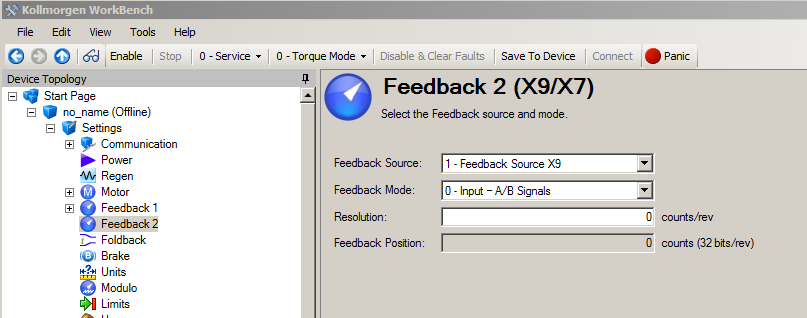
You will also have to setup the encoder settings through workbench in the Feedback 2 screen to set the resolution of the encoder.
Also, if there is no Z-channel in your encoder you might get some drive faults associated with the secondary feedback signal. Instead of having to modify your cable to jumper Z channel wires, you can instead go to the terminal screen of AKD workbench and modify the setting for FAULT130.ACTION (or fault 131, 132, etc.) and change the setting to 1 in order to ignore this fault.
Comments
I have an encoder 3600ppr (14400 counts/rev)
It is mapped correctly, and I can see a position.
If I set UU=1 and FU=1 I would expect to read 14400 counts/rev in PlcOpen, but the return value is scaled wrong.
When looking at index 0x2050 mapped into a variable, I get the correct value in counts.
I moved the encoder approx. 10 revs.
Index 0x2050 shows 144236 counts
MC_ReadActPos gives 35.0
A strange scaling?
The User Units and Feedback Units that you set inside the KAS IDE for the digitizing axis do not need to match the specs on your encoder, but are meant to allow you to set user units to make it easier to program your application. UU is the user units per revolution that you want, so if you want to work in degrees you keep the default of 360 but in your example if you want counts you enter 14400. You only need to change FU if you want non-integer user units, otherwise you have to keep it at the default 1048676. We have examples in our online help documentation showing how to setup user units. You can think of this parameter as a default denominator to set non-integer user units. For example, if you wanted user units to be 5 cm per rev, then you would enter UU = 5 and FU = 1048576. If you wanted user units to be 5.5 cm per rev you enter UU=55 and FU = 10485760. You cannot enter 5.5 directly because only integer values are accepted.
Would this option support connecting two external encoders to the same PDMM by any chance?
Our application involves connecting two separate incremental encoders to X10 and X9.
Cheers
Thanks for the quick reply. Just to clarify, could we use a digitizing axis on both encoders, or would one definitely need to be a servo axis?
The reason is we need to measure the position and velocity from both encoders in real time, which setting up as a digitizing axis seems to be the best solution.
Many thanks
Gd Morning...
Currently, we tried to interface secondary encoder (Make: Heidenhain ECN 425 2048, Endat 2.2) in X9 Input on AKD - P00307 drive.
We are trying to control Position loop via secondary encoder using KAS IDE through PLC Open logic but we can't set proper interface each other. We can't reach accurate position of secondary feedback.
We try in primary feedback with gear ratio that time we achieved exact result.
pls help us... we are stuck on site last 7 days.
Regards,
Haresh
Client / Vendor ID : 55215
From: Gujarat, India
Hello
checking your comments, and applying them to my application issue "read main rewind roller speed in RPM", having and external encoder as axis 5, assembled to the end of roller´s shaft, and configuration as show in next picture
sorry i don not have a good picture that show a complete assembly.
So in KAS IDE, i will be reading axis 5 velocity in degrees per second, whit out matter that its has 250 PPR as resolution, if you say yes, can be conclude that resolution is inproved or increase by KAS IDE ? or just is an position interpolation
The AKD configuration was done as you can see in next picture.
If you want to close the position loop around this external feedback, need to scale it to the primary feedback of the motor which is through parameter FB3.ENCRES described in the link below
https://www.kollmorgen.com/en-us/developer-network/endat-22-and-fb3encres-setting-and-scaling/