


 Home >
 Knowledge Base >
 FAQs >
 Downloads >
Digital Drive Overtravel Plus & Minus Limits Functionality
This article refers to G&L PiC application note document AN000056 and provides information on the functionality of the Digital Drive Overtravel Plus & Minus Limits. This document also includes a description of the functionality and programming tips.
The purpose of this application note is to provide information on the functionality of the Digital Drive Overtravel Plus & Minus Limits. This document will include a description of the functionality and programming tips.
Description of Functionality:
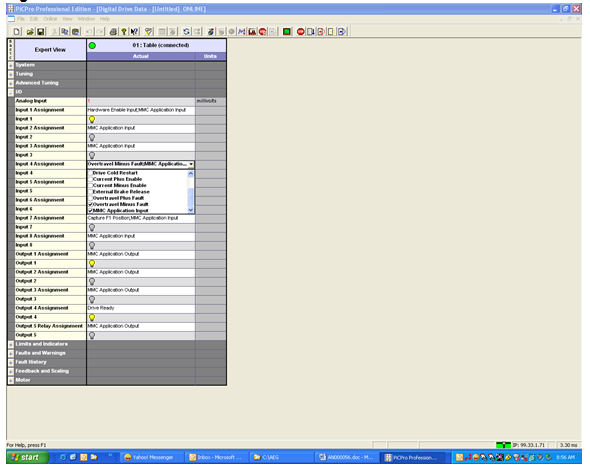
The overtravel plus and minus faults are enforced by selecting the Overtravel Plus or Minus Fault and MMC Application Input in the digital drive data I/O tab. The enforced state is the default. (Refer to Figure 4 below)
When the overtravel plus or minus switch is de-energized in the enforced state the overtravel plus or minus fault will cause:
- The motion to terminate.
- The ladder will indicate a drive fault e-stop.
- The drive indicates a disabled state in drive maintenance.
- An overtravel plus (46) or minus (47) fault appears online in drive maintenance.
- The overtravel plus fault code is indicated by the drive LED.
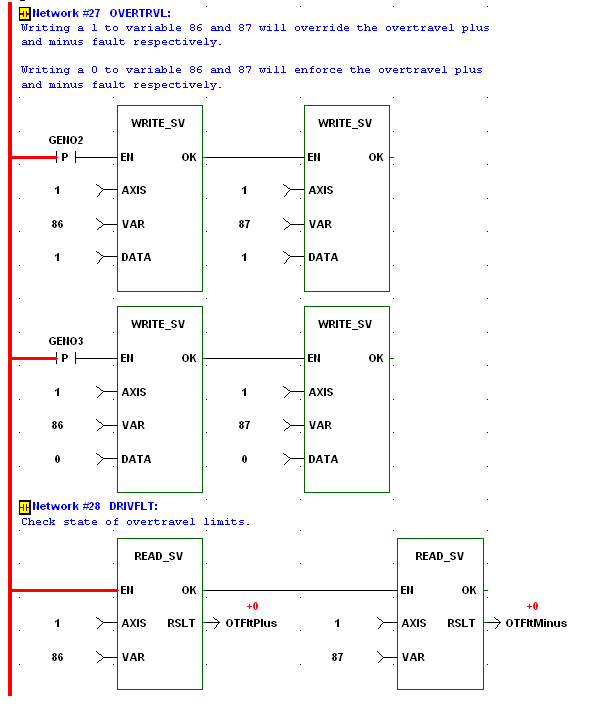
The overtravel plus or minus faults can be ignored by writing a 1 to variable 86 or 87 respectively with the WRITE_SV block.
When the overtravel plus or minus switch is de-energized in the ignore state:
- The motion is terminated.
- The ladder indicates an excess position error.
- The drive indicates a disabled state in drive maintenance.
- An overtravel plus (05) or minus (06) warning appears online in drive maintenance.
The overtravel plus and minus faults can be re-enforced by writing a 0 to variable 86 or 87 respectively with the WRITE_SV block.
Note: If a 1 is written to variable 86 overtravel plus fault or 87 overtravel minus fault a 0 must be written to variable 86 overtravel plus fault or 87 overtravel minus fault to reactivate checking of the overtravel faults.
Below is an example ladder of writing to and reading from variable 86 overtravel plus fault and 87 overtravel minus fault:
Figure 1:
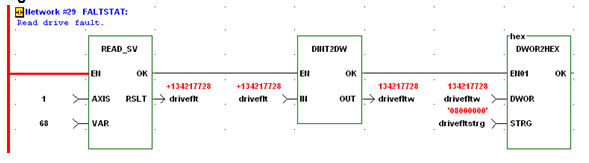
The drive faults and warnings can be monitored by reading variable 68 or 69 as shown in the ladder below. The overtravel plus and minus fault would be indicated by the string variable “drivefltstrg” as 4000000 and 8000000 respectively.
Figure 2:
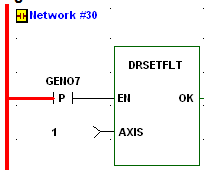
The fault can be reset with the DRSETFLT function block if a1 is written to variable 86 overtravel plus fault or 87 overtravel minus fault or if the fault limit switch is manually cleared.
Figure 3:
Overtravel Fault Set up Procedure:
- Wire the overtravel fault limit switches to the desired drive inputs.
- In the digital drive data I/O tab select the input assignment where the minus limit switch is wired, check both the Overtravel Minus Fault and MMC Application Input selections. Selecting these, by default, will enforce the overtravel minus fault.(Refer to Figure 4 below)
- In the digital drive data I/O tab select the input assignment where the plus limit switch is wired, check both the Overtravel Plus Fault and MMC Application Input selections. Selecting these, by default, will enforce the overtravel plus fault. (Refer to Figure 4 below)
- Program the WRITE_SV function block to enforce the overtravel plus and minus faults by writing a 0 to variable 86 or 87 respectively. (Refer to Figure 1 above)
- Program the WRITE_SV function block to ignore the overtravel plus and minus faults by writing a 1 to variable 86 or 87 respectively. (Refer to Figure 1 above)
- If desired program the READ_SV function block to read the status of variable 86 overtravel plus fault and 87 overtravel minus fault. (Refer to Figure 1 above)
- If desired program the READ_SV function block to read the status of variable 68 drive faults or variable 69 drive warnings. (Refer to Figure 2 above)
- If desired program the DRSETFLT function block to reset the drive faults. (Refer to Figure 3 above)
Below is a screen print of the digital drive data I/O tab input assignment selection.
Figure 4:
Overtravel Fault Recovery Procedure:
- Overtravel fault is activated.
- Write a 1 to variable 86 overtravel plus fault or 87 overtravel minus fault.
- Enable the DRSETFLT function block.
(This step is not necessary because the fault is reset when the drive is enabled.)
- Enable the drive; this will also clear the plus or minus drive fault.
- Jog off of the overtravel limit switch.
- Write a 0 to 86 overtravel plus fault or 87 overtravel minus fault to reactivate checking of the overtravel faults.