


 Home >
 Knowledge Base >
 FAQs >
 Downloads >
2100 Series Executive Firmware Upgrade Procedure
This document refers to G&L PiC application note AN000030 and describes 2100 series executive firmware upgrade procedure.
Model 2180/2185 Executive Upgrade Procedure
Purpose: This is a procedure is to test 2100 Series models 2180 and 2185.
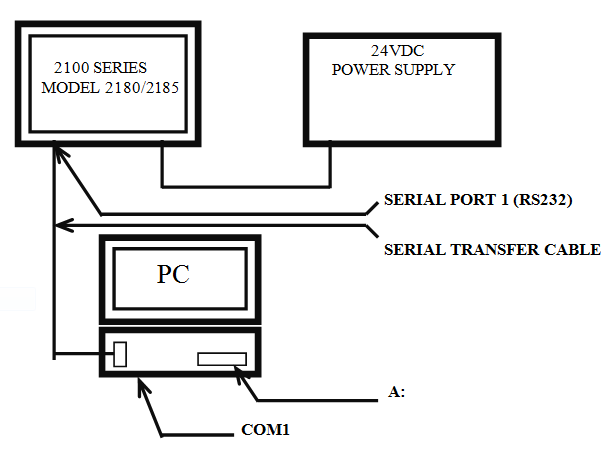
Hardware Requirements:
24VDC power supply (at least 625 mA)
2100 Series to be loaded with new executive
Personal Computer
Floppy Disk with File Transfer Utility and new Executive Firmware
Executive Serial Transfer Cable
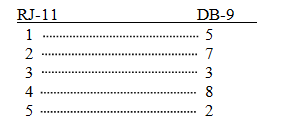
Procedure
-
Create a floppy disk with the newest executive firmware file (termemm1.exf) and the File Transfer Utility (PMCXFER.EXE)
-
Hook the serial transfer cable from the PC COM1 to Serial Port 1 on the 2180/2185
-
Apply power to the 2180/2185 push and hold down on the lower right hand corner of the touchscreen
-
When the screen blanks out release the lower right hand corner and the time should appear at the top of the screen. The screen is now in the serial transfer mode.
At c:\ type a: to run the file transfer utility off the floppy drive.
At a:\ type <pmcxfer>
Select the following:
-Transfer 1500 information
-Download Executive firmware
-<F1> to select TERMEMM1.EXF
-<F1> to download
-<Y> yes you are sure
Note: The process takes 8-10 minutes to download
Press CANCEL on the touchscreen when finished
To upload the executive firmware to another unit restart the procedure at step 2, otherwise exit the file transfer utility and shut down the PC.