


 Startseite >
 Knowledge Base >
 FAQs nach Themen >
 Downloads >
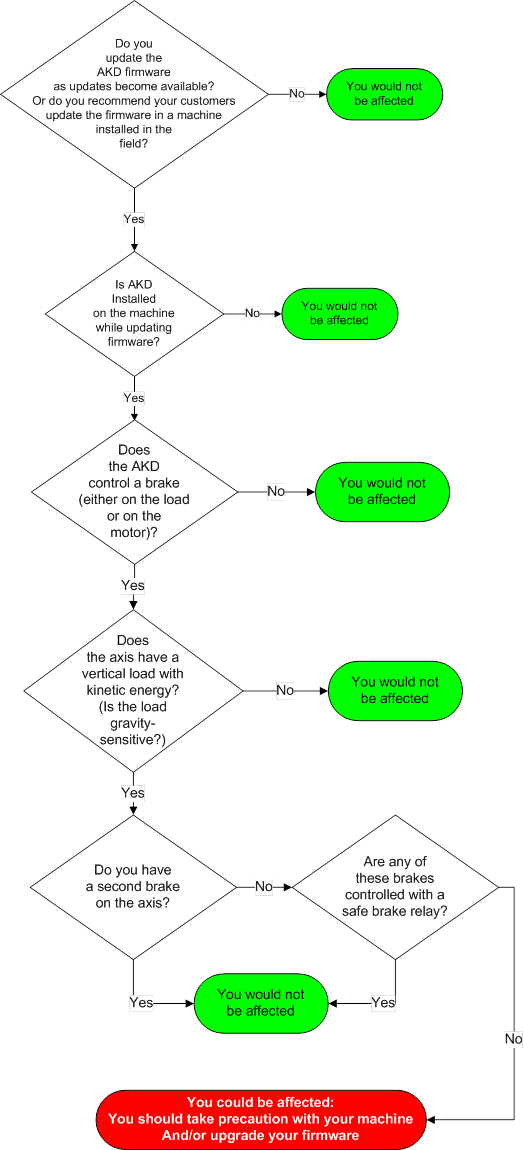
The following flowchart will guide you to help determine whether you are affected by the Backup FPGA firmware. If you are, please download the new files and instructions.

Kollmorgen Support Network
The below represents frequent questions our support, engineering and sales teams have been asked over the years. If you have a question, please submit our contact us form to reach our application engineering team.
The following flowchart will guide you to help determine whether you are affected by the Backup FPGA firmware. If you are, please download the new files and instructions.
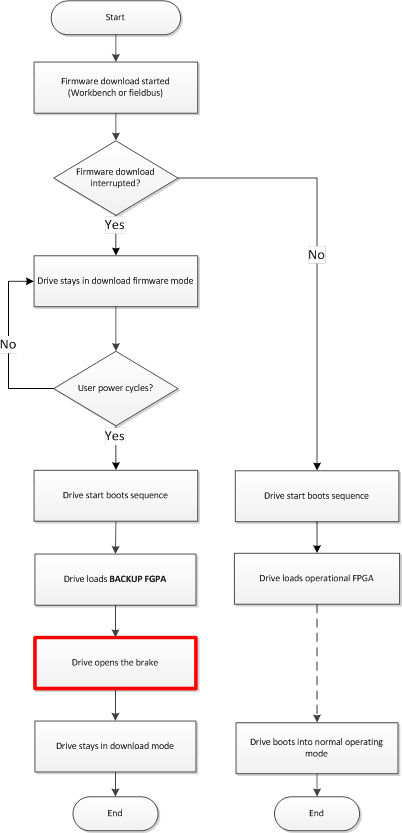
The sequence of events leading to possible brake disengagement is described in this flow chart. The box marked in red shows the wrong behavior due the fault condition.
No. The Backup FPGA firmware is not part of the standard beta or production release of operational firmware. The Backup FPGA firmware is programmed separately, and requires special files and process. The files and process are listed in this article.
No. The Backup FPGA firmware is not part of the main AKD firmware and is not used under normal operating conditions.
Connect to the AKD. Go to terminal view. Enter the command “DRV.INFO”. In the section "FPGA", you can read the Backup FPGA firmware version.
For example:
FPGA
Version             : FP0006_0602_00_00
Operational image   : FP0006_0602_00_00
Resident image      : FPB006_0602_00_01
Size                : 45
The version for the Backup FPGA firmware can be found under "Resident image".
The coding is a follows: FPB00x_yyyy_yy_yy, where “x” represents a certain type, and “y” represents the version number. In this example the version is 0602_00_01.
All Backup FPGA firmware versions FPB0xx_0300_00_00 through FPB0xx_0602_00_01.
0300_00_00 was released in March 2012; 0602_00_01 was released 10 April 2017.
The next question, How can I figure out the current version of my Backup FPGA firmware?, explains how to discover what version you have.
Yes, you can update the Backup FPGA firmware yourself. Instructions to upgrade the Backup FPGA firmware can be found on this page or downloaded. The downloadable file may also be found as an attachment at the bottom of this page.
No. The brake will not disengage during a firmware download.
The brake may disengage during a reboot if the download fails and the user firmware has been corrupted.
The following serial numbers are affected by the bug:
The following model numbers are affected by the bug:
NOT affected are models beginning with AKD-N, AKD-C.
One of the following countermeasures can prevent this issue:
With the use of PFH (Probability of Dangerous Failure per Hour) value you can build a relation between PL (Performance Level) and SIL (Safety Integrity Level). See page Safety.